
AI PLC Troubleshooting for Maintenance Teams Without the IDE
Most people who need PLC answers never open Studio 5000 or TIA Portal. How role-based AI gives operators and maintenance teams answers they can act on.
At 2 a.m. an injection molding station sits in Auto and will not start a cycle. The person who gets the call is the operator on shift, not the controls engineer who wrote the program. The operator has never opened the PLC project, has no license for the software that opens it, and even with one, the ladder logic would mean nothing. What the operator needs is an answer in plain language: what is stopping the machine, what usually causes it, and what to do first.
Most of the discussion about AI and PLCs skips that person. It asks how an AI copilot can help an engineer write or edit code faster inside Studio 5000, TIA Portal or CODESYS. That is a real question, but it is a question for the few people in a plant who have the IDE. This post is about everyone else, which in most plants is the majority of the people who deal with PLC-controlled equipment every day, and about what an AI answer has to look like for it to be useful to them.
In short: role-based AI for PLC troubleshooting means the same question about a machine, asked against the same PLC program and live data, is answered differently for a control engineer, a maintenance engineer and an operator. The engineer gets routines, tags and links into the code; the maintenance engineer gets a diagnosis and a fix; the operator gets plain language and the next step. It works outside the engineering software, across Allen-Bradley Studio 5000, Siemens TIA Portal and CODESYS V3 projects, so the people without an IDE license get useful answers, and the people with one are not interrupted. (For the broader background, see what PLC AI is and our PLC troubleshooting guide.)
Who actually needs PLC answers on a plant floor?
Far more people than the ones who can read the code. In a typical plant, one or two controls engineers (often an outside integrator) own the PLC programs. Around them sit the people who live with the machines: maintenance technicians on every shift, production and process engineers, line supervisors, reliability engineers, quality engineers and plant management. When equipment stops, the first person on the scene is almost never the controls engineer.
The numbers reflect that. The U.S. Bureau of Labor Statistics counts about 547,300 industrial machinery mechanics, machinery maintenance workers and millwrights, and projects the group to grow 14% between 2025 and 2035, much faster than average, with roughly 51,900 openings a year (BLS Occupational Outlook Handbook). Those are the people who "install, maintain, and repair factory equipment and other industrial machinery"; most of them will never hold a Studio 5000 or TIA Portal license. At the same time, Deloitte and the Manufacturing Institute estimate manufacturers could need as many as 3.8 million new employees by 2033, with 1.9 million roles going unfilled if the skills gap is not closed (The Manufacturing Institute). The experienced technician who knew every quirk of line 3 is retiring, and the person taking over is being asked to keep the same equipment running with less context than anyone before.
So the question that matters for a plant is not "how do we make our controls engineer 20% faster in the IDE?" It is "how do we give the other 95% of the people who touch this equipment the answers that today live only in the controls engineer's head and in the PLC program they cannot open?"
Why can't an AI copilot in Studio 5000 or TIA Portal help maintenance technicians?
Because they do not have the IDE, and were never meant to. Studio 5000 Logix Designer, TIA Portal and CODESYS are engineering environments: Rockwell describes Logix Designer as a "multi-discipline design environment for Logix Controllers," sold by edition through distributors (Rockwell Automation). Licenses are bought per seat for the engineers who program controllers. Nobody buys one for the night-shift maintenance technician, and no plant manager wants a dozen people with write access to the running program.
That is the quiet problem with the current wave of "AI for PLC" tools. Whether the assistant is Siemens Industrial Copilot inside TIA Portal, a third-party plug-in for Studio 5000, or a general model you paste code into, its starting point is a person sitting in the IDE looking at code. It is built to make the expert faster. That is useful, and we have written about what works for Studio 5000, for mixed-vendor plants and in our comparison of AI tools for PLC programming. But it leaves the structure of the plant exactly as it was: every question still routes to the one person who can open the project.
Three things follow. First, the IDE copilot's reach is capped at the number of IDE seats, which is usually one to three per site. Second, it does nothing for the moment that actually costs money, which is the 2 a.m. stop handled by someone without the software. Third, even if you gave the technician the IDE and a copilot, a code-level answer ("rung 14 in routine R_Fill is interlocked by B3:2/5") is not an answer a technician can act on. The bottleneck was never typing speed in the editor. It was that the knowledge of how this line works is locked inside a format only a few people can read.
What do operators, maintenance engineers and control engineers each need from a PLC answer?
Different things, from the same underlying facts. Ask "why is the machine stuck?" and the right answer depends entirely on who is asking. In practice a plant has at least three audiences, not two.
| Control engineer | Maintenance engineer | Operator | |
|---|---|---|---|
| Goal | Understand and, if needed, change the logic | Diagnose the fault and apply the fix | Get the line running safely, now |
| Has the IDE | Yes | Rarely | No |
| Reads ladder / SCL / ST | Yes | Sometimes | No |
| Wants in the answer | The rung or network, tags and interlocks, cross-references, a link into the code | What is wrong, the likely causes in order, what to check and how to fix it | What the alarm means in plain words and what to do next, no code terms |
| Format that works | Full technical detail, with code | Diagnosis first, then the fix | Plain language |
| Wrong answer looks like | A vague summary with no tag names | A wall of ladder logic | Anything that mentions a tag or a rung |
The controls engineer is served by precision: tag names, rung numbers, the exact interlock chain, and a link that opens the relevant routine. For a maintenance engineer most of that is noise. They need the condition translated into the machine's physical reality ("barrel zone 4 reads 0 °C, which usually means a broken thermocouple or a dead heater zone") and a sequence to follow ("check the zone 4 sensor and its wiring, then clear A-205"). For an operator, even the tag name is too much; the answer has to say what the machine is waiting for and what to do next. If an answer sends either of them to the code, it has failed, because for them the code is not a place they can go.
Most AI tools pick one of these audiences, nearly always the first, and serve the others badly. The alternative is to treat the reader's role as an input to the answer, not an afterthought.
How does role-based AI for PLC troubleshooting work in PLCs.ai?
In PLCs.ai, every answer is produced in one of three answer styles: Control Engineer, Maintenance Engineer or Operator. The underlying source is the same: the plant's actual PLC programs (Studio 5000, TIA Portal, CODESYS V3), its documentation and, where connected, live tag values, all held in a single automation context. What changes is how that source is turned into an answer and what the screen around it looks like.
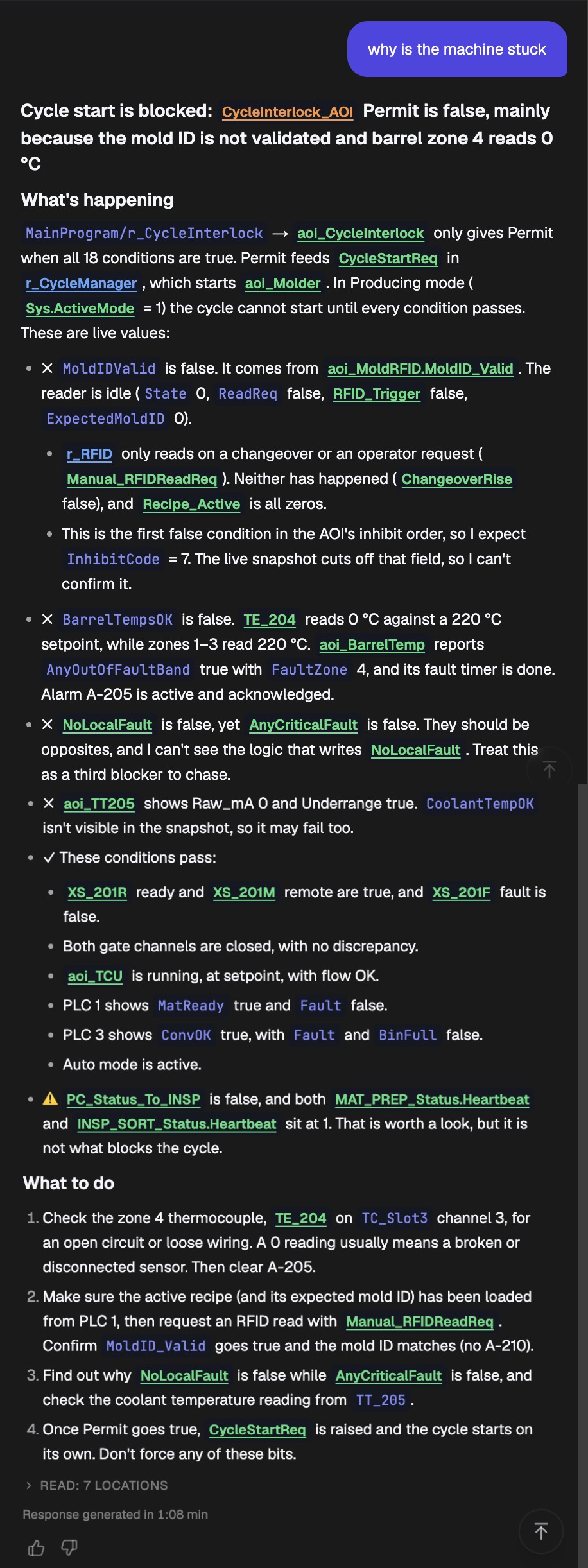
Control Engineer: full technical detail, with code. The experience is built around the program. Answers cite the specific routines, rungs or networks and the tags involved, and carry quick links that open the referenced code where it is needed. The engineer can go from the answer to the logic in one click and verify it.
Maintenance Engineer: diagnosis first, then the fix. The same question produces an answer written for someone who will act on it at the machine. It states what is wrong, lists the likely causes in the order they are worth checking, and then gives the fix, with the controls engineer brought in only when a logic change is needed.
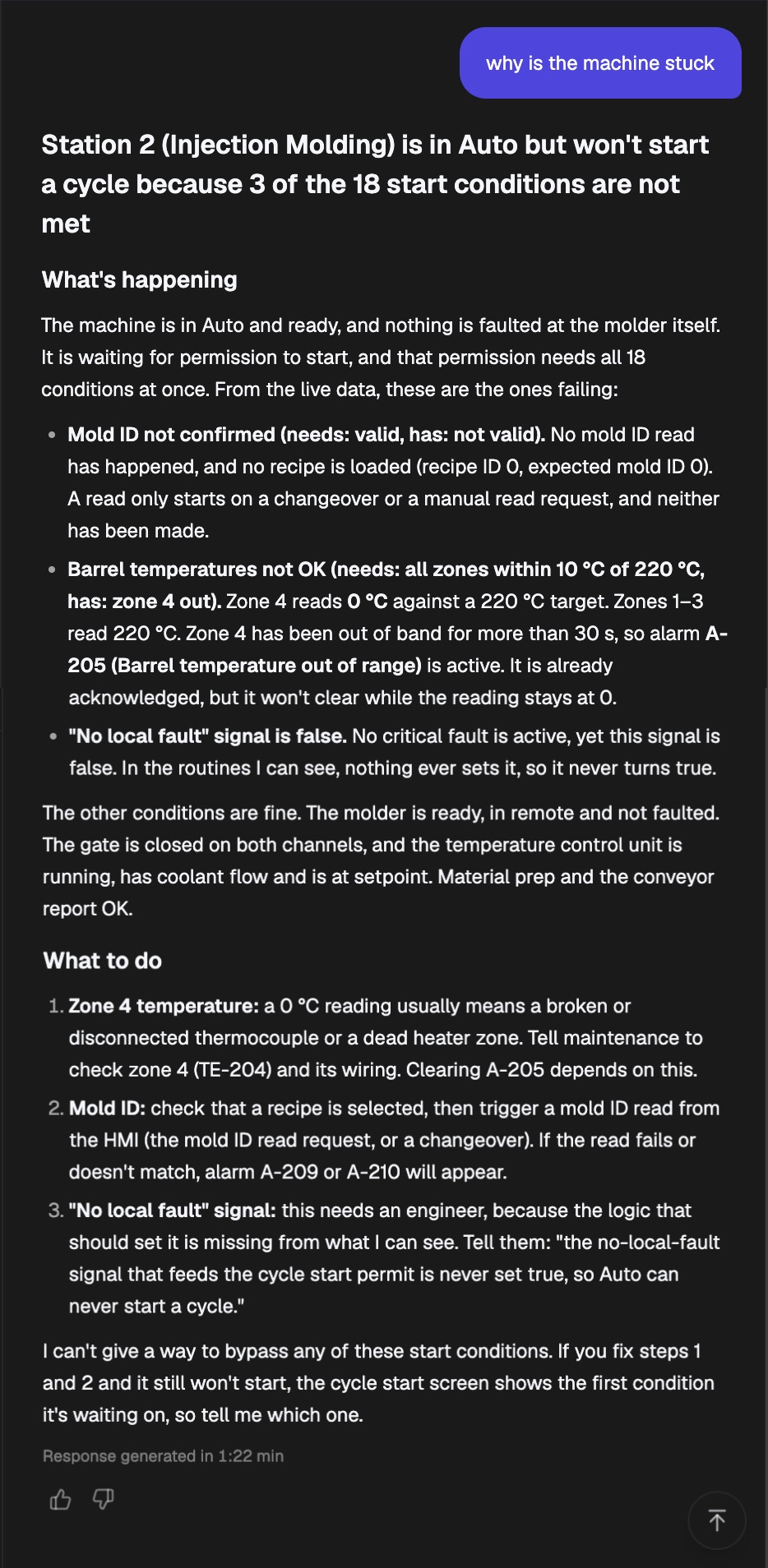
Operator: plain language, no code terms. For the person running the line, the answer drops tag names, rung numbers and programming vocabulary altogether. It says what the alarm means for the machine and what to do next, in the words used on the floor.
Detailed or to the point, in every style. A Detailed switch sits next to the answer style. Off, the answer gives the conclusion and the next step; on, it walks through the reasoning and the evidence behind it. A control engineer in a hurry and an operator who wants to understand the "why" both get what they asked for. The same picker also separates Explain (explain and troubleshoot) from Generate (update PLC code), so a non-expert style is never one click away from changing the program.
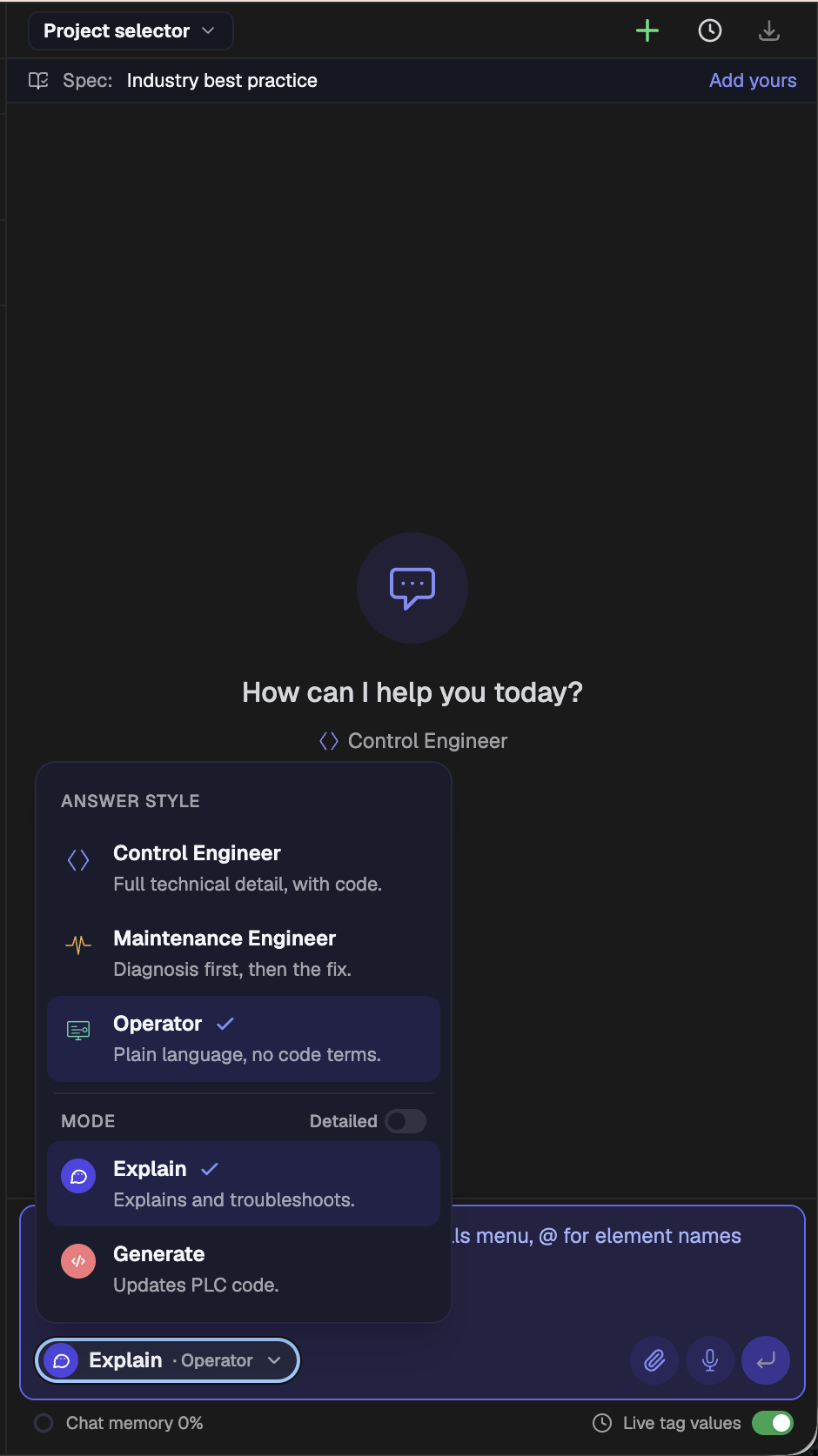
The organization assigns each user a role, and that role sets the ceiling. A control engineer can choose any of the three styles, which is useful when the engineer wants to read the answer the way an operator will see it. A maintenance engineer gets the Maintenance Engineer and Operator styles. An operator gets the Operator style only, and does not see the Generate mode at all. The plant decides who sees code-level detail and who can ask for code changes, and nobody is one click away from a capability their role does not include.
Can an operator troubleshoot a PLC fault without the IDE? A real example
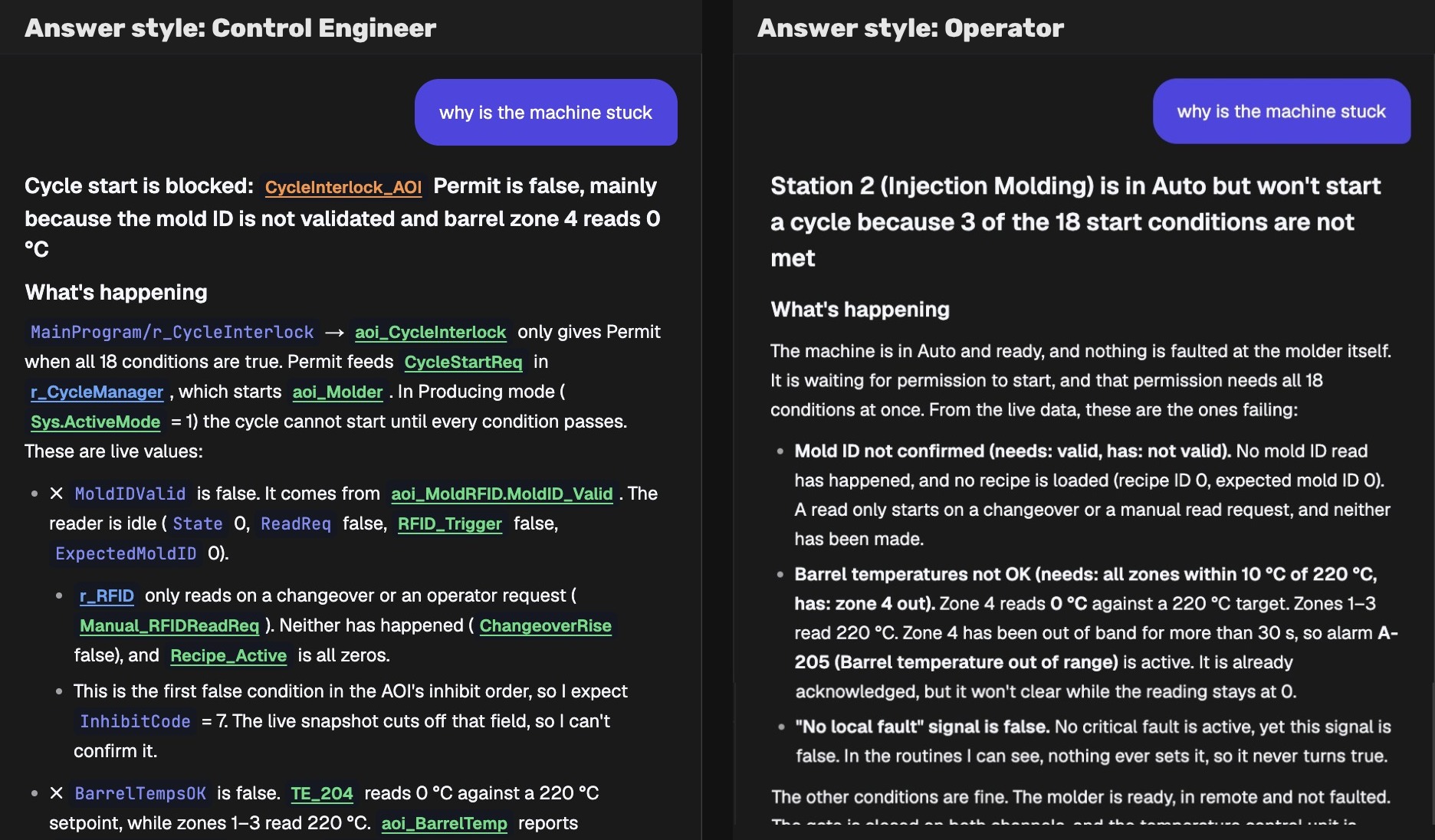
This is a real exchange, lightly trimmed. An injection molding station is in Auto and will not start a cycle. Nothing is faulted, yet the line is down, which is the situation we described in how to trace an HMI alarm back to its root cause. Two users ask PLCs.ai the same four words, "why is the machine stuck", with live tag values connected. Here are the two answers side by side.
The Control Engineer answer opens with the mechanism: cycle start is blocked because the CycleInterlock AOI's Permit is false. It traces the chain, MainProgram/r_CycleInterlock to aoi_CycleInterlock, Permit feeding CycleStartReq in r_CycleManager, which starts aoi_Molder, and then walks the 18 permit conditions against live values. MoldIDValid is false because the RFID reader is idle and no read was requested. BarrelTempsOK is false because TE_204 reads 0 °C against a 220 °C setpoint while zones 1–3 are at 220 °C, so alarm A-205 is active. NoLocalFault is false although AnyCriticalFault is also false, and the assistant says plainly that it cannot see the logic that writes NoLocalFault, so it should be treated as a third blocker. It lists the conditions that pass, flags a heartbeat status worth a look but not the cause, and ends with four steps: check the zone 4 thermocouple on TC_Slot3 channel 3, load the recipe and request an RFID read with Manual_RFIDReadReq, find out why NoLocalFault is never set, and let CycleStartReq raise on its own once Permit is true. Every tag is a link into the project. Seven code locations were read to produce it.
The Operator answer opens with the situation: Station 2 (Injection Molding) is in Auto but will not start a cycle because 3 of the 18 start conditions are not met. Nothing is faulted at the molder; it is waiting for permission to start. Then the three failing conditions in words an operator uses: the mold ID has not been confirmed because no read has happened and no recipe is loaded; barrel zone 4 reads 0 °C against a 220 °C target, which is why alarm A-205 is active and will not clear; and a "no local fault" signal is false even though nothing is actually faulted. It confirms that everything else, the gate, the temperature control unit, material prep and the conveyor, is fine. The "what to do" is three items in order: a 0 °C reading usually means a broken thermocouple or dead heater zone, so tell maintenance to check zone 4 (TE-204) and its wiring; select a recipe and trigger a mold ID read from the HMI; and the third one needs an engineer, with the exact sentence to pass on. It closes by refusing to offer a way to bypass any start condition. Not one tag name or routine appears.
A Maintenance Engineer answer to the same question sits between the two: diagnosis first (the zone 4 thermocouple, the RFID read, the unset signal), then the fix, with the relevant tags named so the technician can confirm readings at the panel but without the walk through the interlock chain.
Same question, same program, same live data. One answer is a map into the code; the other is a procedure at the machine, and it already knows which of its three steps the operator can do alone and which one to hand to maintenance or to an engineer. Neither is a watered-down version of the other, and the second could not have been produced by a tool whose starting point is an open IDE. Notice also what both answers refuse to do: neither offers a way to force a bit or bypass a start condition.
What does role-based PLC troubleshooting mean for the plant?
The value moves from one seat to the whole plant. When the only people who can answer a PLC question are the ones with the IDE, every shift's problems queue behind them, and the plant's knowledge of its own lines lives in two or three heads and a folder of project files. When maintenance and production engineers can ask the same source directly and get answers in their own terms, three things change.
First, mean time to repair drops at the moment it matters, because the person already standing at the machine can start on the most likely cause instead of waiting for a callback (see how to reduce MTTR in manufacturing). Second, the controls engineer stops being the help desk and gets back to engineering; the questions that still reach the controls engineer are the ones that need a logic change. Third, the plant stops depending on tribal knowledge: the behaviour of line 3 is explained from the program itself, so it survives the retirement of the person who used to explain it.
| AI copilot inside the IDE | Plant knowledge platform (PLCs.ai) | |
|---|---|---|
| Who can use it | Engineers with an IDE seat (typically 1–3 per site) | Everyone the plant assigns a role: operators, maintenance, controls |
| Where it runs | Inside Studio 5000, TIA Portal or CODESYS | Outside the IDE, in a browser or desktop app |
| What it reads | The project open in the editor | All PLC projects across vendors, documentation and live tag values |
| What it answers | How to write, edit or understand code | Why the machine stopped, what to check, what to fix, and the code when asked |
| Shape of the answer | One shape, for a programmer | Three answer styles, chosen by role, plus a Detailed switch |
| Can it change the program | Yes, that is its purpose | Only in Generate mode, for roles the plant has cleared |
| Best at | Making an expert faster | Letting the whole plant get answers without the expert |
This is also why the "which AI copilot for my IDE" question is the wrong frame for a plant. A copilot makes an expert's existing workflow faster. A platform that understands the plant's automation and answers each role in its own language changes who can participate in keeping the line running. The first is a productivity tool for a few; the second is operational capability for the organization. They are not competing for the same seat.
Frequently asked questions
Can a maintenance technician troubleshoot a PLC fault without Studio 5000 or TIA Portal?
Yes, if the knowledge in the PLC program is made available outside the IDE. PLCs.ai reads the plant's PLC projects and answers questions about alarms, faults and machine behaviour in plain language, so a technician does not need the engineering software or the ability to read ladder logic to get an actionable answer.
Do you need to read ladder logic to understand why a machine stopped?
No. The logic explains the stop, but the explanation can be translated into the physical cause (a sensor that did not respond, an interlock that was not satisfied) and the checks to perform. That translation is what a role-aware AI does for non-programmers.
What is the difference between an AI copilot in the IDE and a platform like PLCs.ai?
An IDE copilot works inside the engineering software and helps the engineer who has it write, edit and understand code. PLCs.ai works outside the IDE, across Studio 5000, TIA Portal and CODESYS projects, and serves everyone in the plant, with answers shaped to each user's role. Many plants use both; they solve different problems.
How does PLCs.ai know which kind of answer to give?
The organization assigns each user a role, and the user picks an answer style at or below that role: Control Engineer (full technical detail, with code), Maintenance Engineer (diagnosis first, then the fix) or Operator (plain language, no code terms). A control engineer can use all three; an operator sees only the Operator style. A Detailed switch controls how much reasoning is shown.
Does giving maintenance staff and operators access to PLC knowledge mean giving them access to change the program?
No. Generate mode, which updates PLC code, is only available to roles the organization has cleared for it; an operator does not see it. Everyone else works in Explain mode, which answers questions from the program without touching it. The IDE and write access to the controller stay with the controls engineers.
Which PLC platforms does this work with?
Allen-Bradley / Rockwell Studio 5000 projects, Siemens TIA Portal projects and CODESYS V3 projects, including plants that run more than one (see mixed-vendor PLC troubleshooting).
Upload a project and ask the same question as an engineer and as a technician.
Start a free trial →More from the blog
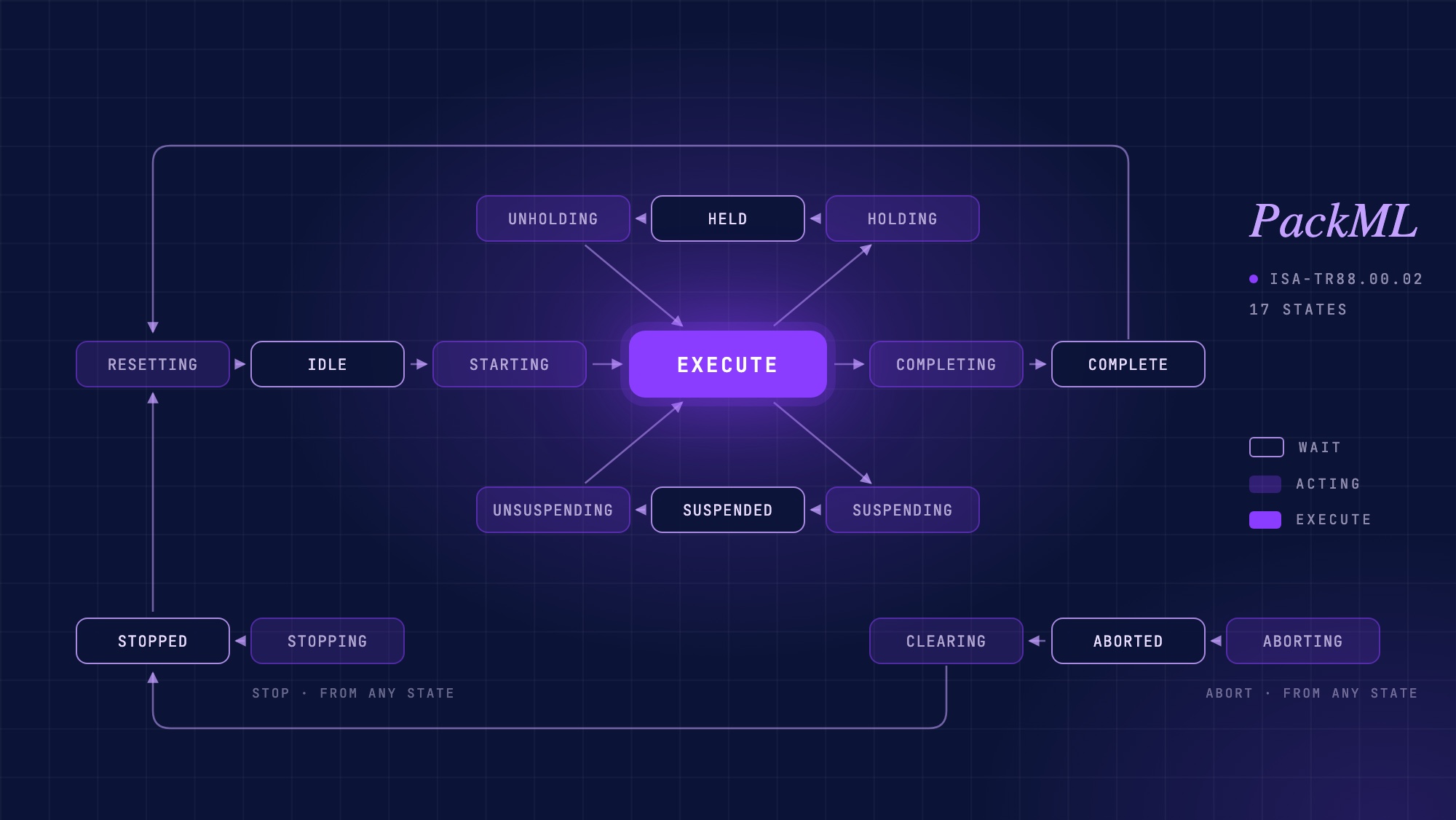
PackML explained: the state model, PackTags, and where AI fits
What PackML is, how the 17-state machine, modes and PackTags work, how to check whether a PLC project really follows it, and where AI helps.
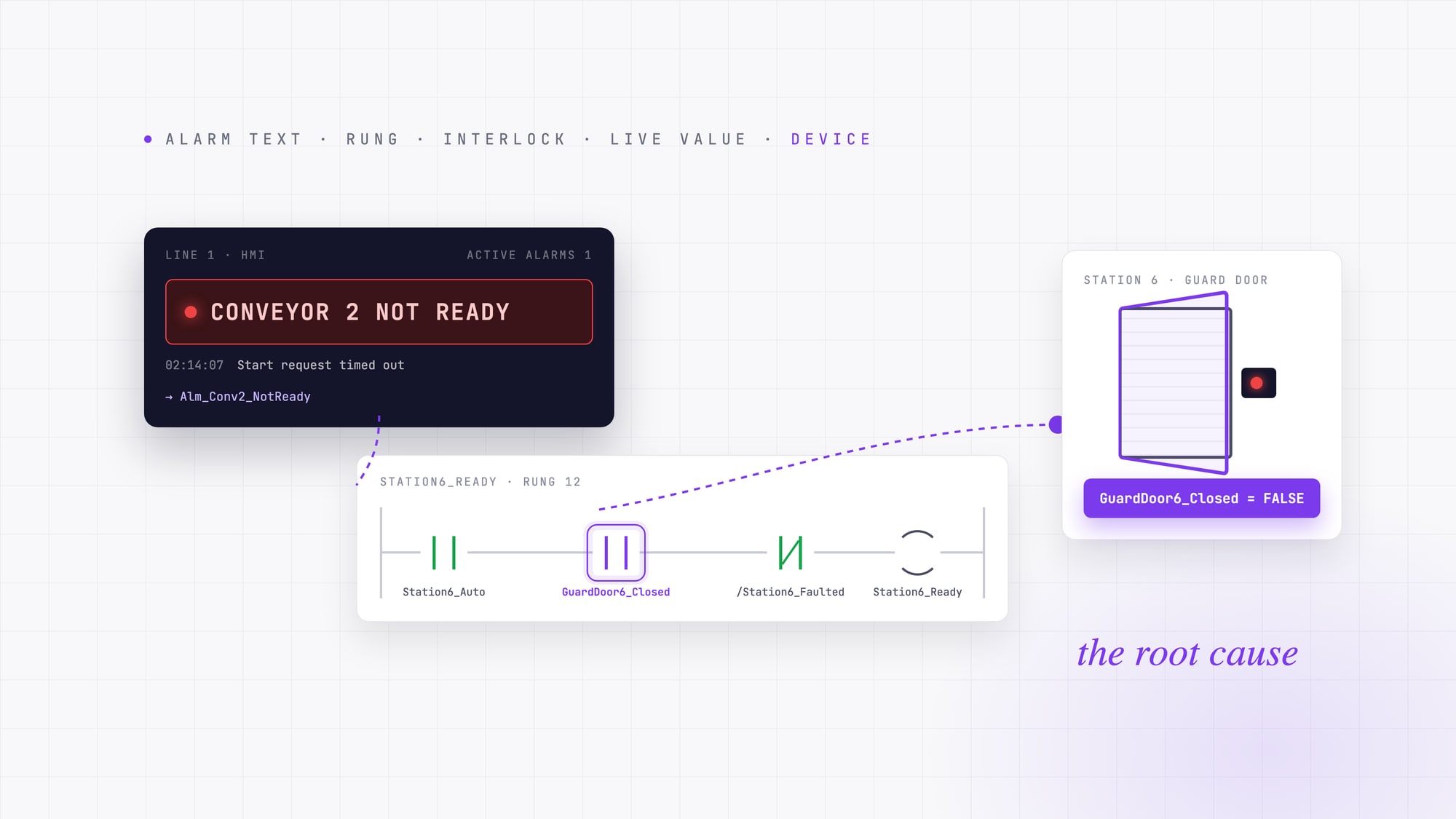
PLC fault codes and HMI alarms: how to trace an alarm back to its root cause
A PLC fault code or HMI alarm tells you where troubleshooting starts, not why the machine stopped. A field method for tracing an alarm from its text to the device behind it.
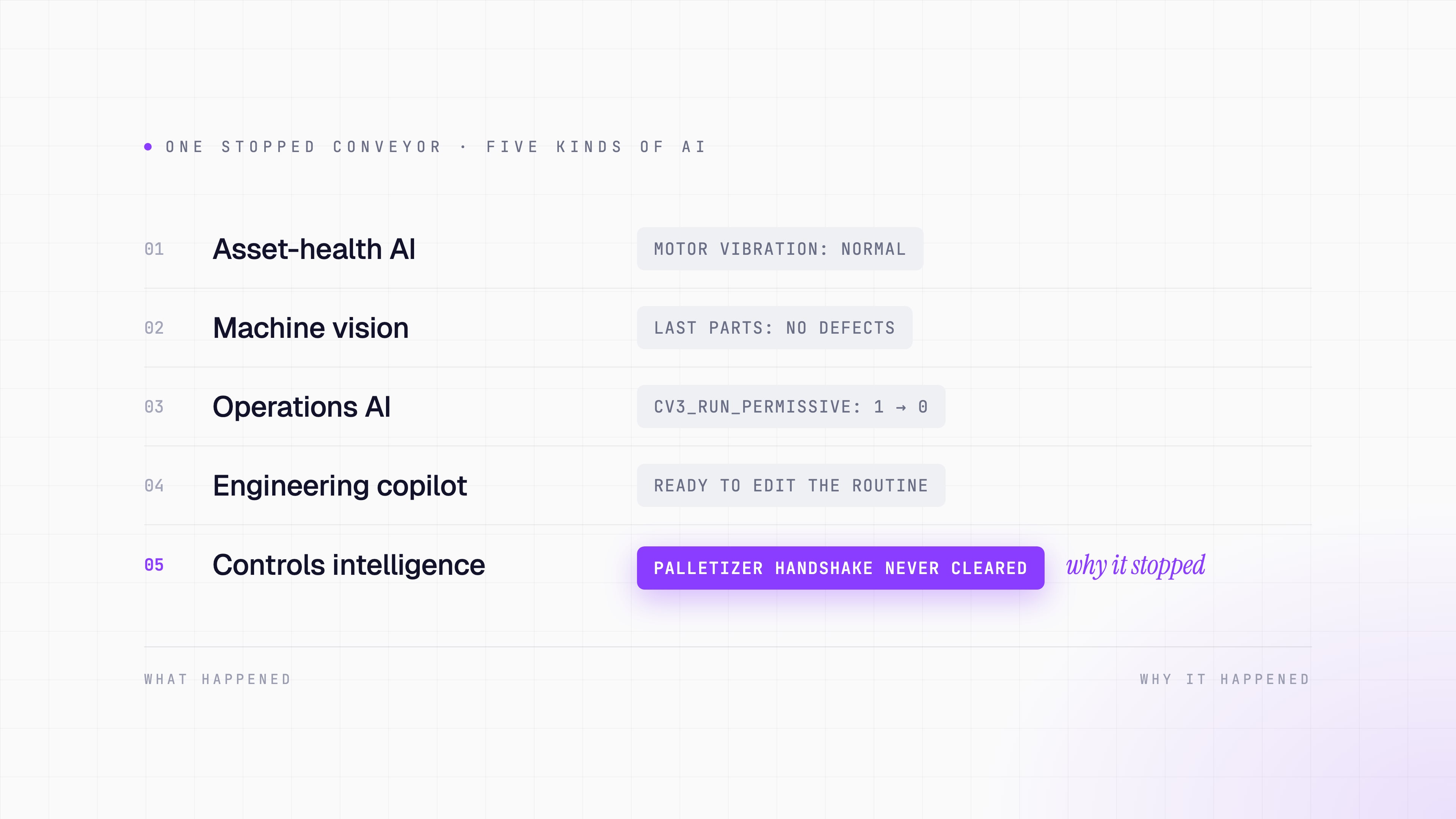
What is the best AI for industrial automation in 2026?
There is no single best AI for industrial automation. Compare industrial AI by the problem it solves, from machine vision to PLC troubleshooting.