
Three steps from symptom to root cause.
Upload the project
A Studio 5000 L5X export, a TIA Portal project pulled straight from the IDE by the Desktop Companion App, or a CODESYS V3 export. Legacy or modern, documented or not. No tag mapping, no integration project.
Ask in plain English
Describe the symptom the way an operator reports it. The AI traces it through rungs, interlocks, permissives, and cross-PLC handshakes, and names the candidates that can actually cause it.
Confirm against the live line
The Desktop Companion App streams live tag values from the running controller, so each candidate is confirmed or ruled out in seconds. You get the root cause, the evidence, and a fix grounded in what the machine is doing right now.
Live values from the controller,
inside the conversation.
The Desktop Companion App connects to your running controller and streams live tag values straight into PLCs.ai. The permissive you are reasoning about stops being a line in the code and becomes a real value, updating as the line runs.
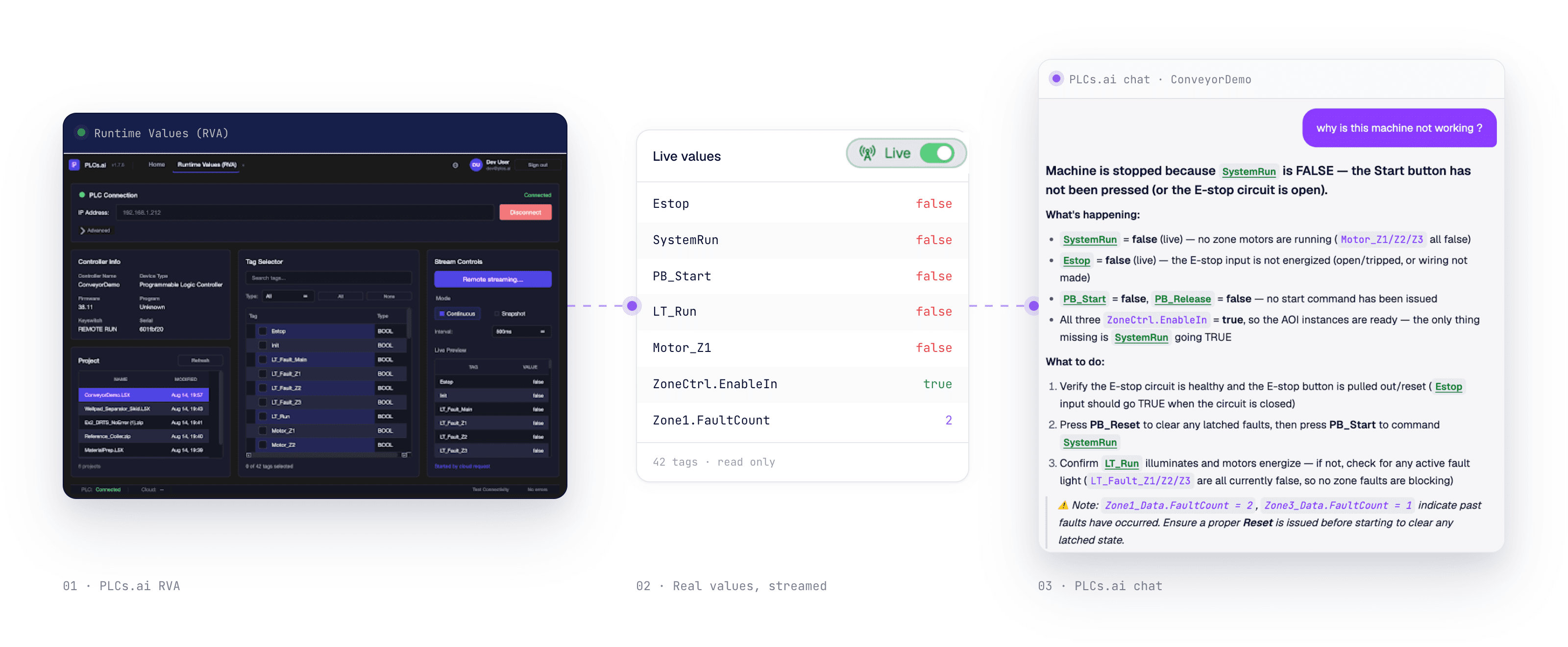
Read-only, always. The Desktop Companion App never writes back to the PLC. It observes the controller; it cannot touch it.
Across the line. Live streaming works across mixed-vendor lines, not just one controller.
History included. Tag history lets the AI compare what the line is doing now against what it was doing before the fault.
Purpose-built analyses, one command away.
Much of a repair hour is diagnosis, not wrench time. That is the share AI troubleshooting attacks. See every number and its source →
PLC troubleshooting with AI, answered.
01Can AI troubleshoot a PLC?
Yes, if it can see enough. PLCs.ai reads the entire project file (every routine, tag, UDT, and cross-reference), traces a fault backwards through interlocks and permissives, and then confirms or rules out the root cause against live tag values streamed from the running controller. A theory that used to need a walk to the panel becomes a verdict on the same screen.
02How does AI find the root cause of a PLC fault?
You describe the symptom in plain English ("station 40 will not start"). The AI traces the start condition through the logic, finds every rung and tag that can hold it false, checks each one against live values, and names the exact tag and rung responsible, with a suggested fix and the evidence it used.
03Does it work with Allen-Bradley and Siemens?
Both, in full production. Studio 5000 and RSLogix 5000 projects via L5X export; TIA Portal projects via the Openness API, exported directly by the Desktop Companion App with no manual step. Mixed lines are handled too: 3D Line Context reasons across every PLC on the line as a single surface.
04Can it see what the controller is doing right now?
Yes. The Desktop Companion App streams live tag values and history from the running controller into the conversation, read-only, never writing back to the PLC. The permissive you are reasoning about stops being a line of code and becomes a live value updating as the line runs.
05Do maintenance technicians need to read ladder logic to use it?
No. Questions go in as plain English and answers come back as plain English, with the relevant logic shown and explained. Technicians troubleshoot in natural language while engineers can drill into the exact rungs behind every answer.
06Can it change my PLC code on its own?
No. Troubleshooting is read-only. When you ask for a fix, the generated change is a reviewable proposal that is simulated and checked against your standards before anyone can save it, and nothing ever writes to a live controller.
07Can PLC troubleshooting tools trace fault codes and HMI alarms to the root cause?
Manufacturer fault codes can often be decoded from vendor documentation, while custom HMI alarms usually need to be traced through the PLC program. A complete trace follows the alarm bit to the rung that sets it, the failed interlock or permissive, the live tag value, and finally the physical device. See how to trace a PLC fault code or HMI alarm to its root cause.