
PackML explained: the state model, PackTags, and where AI fits
What PackML is, how the 17-state machine, modes and PackTags work, how to check whether a PLC project really follows it, and where AI helps.
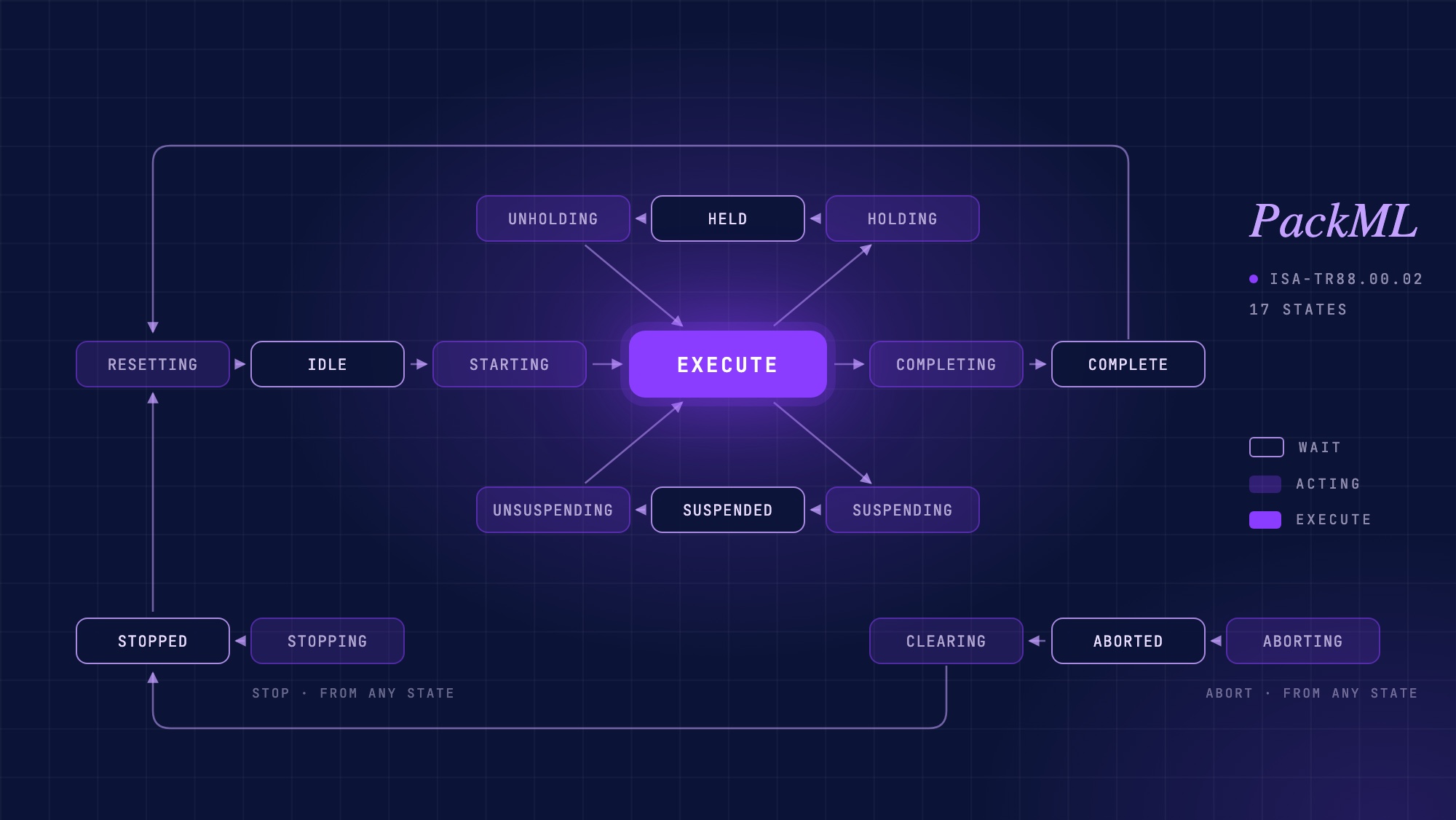
PackML is an industry standard, developed by OMAC and published by ISA as ISA-TR88.00.02, that defines how an automated machine should behave: a state model with 17 states, a set of operating modes, and a standard tag structure called PackTags for commands, status, and administration. It exists so that machines from different builders look and behave the same way to operators, to the line controller, and to the software above them. It is used far beyond packaging, and it is one of the most useful pieces of context an AI system can have when reading a PLC program.
What is PackML?
PackML stands for Packaging Machine Language. It began in the OMAC Packaging Workgroup in the early 2000s, when packaging end users and OEMs wanted machines that could be integrated into a line without every integrator inventing a new start/stop/fault convention. ISA incorporated it into the ISA-88 family as technical report TR88.00.02, first published in 2008 and revised in 2015. The 2015 edition is the one most new implementations target.
Despite the name, PackML is not specific to packaging. The state model and tag structure fit any discrete machine that starts, runs, holds, suspends, aborts and resets: filling, labeling, palletizing, assembly cells, converting lines, and machines in food, beverage, pharma and consumer goods plants. OMAC describes the goal as consistent machine data, consistent behavior, and a common look and feel across the plant floor.
A PackML implementation has three parts: the state model (how the machine behaves), the unit modes (which behavior set is active), and PackTags (how the machine exposes commands, status and production data). The standard also assumes the ISA-88 physical model for structuring the program, which is where most real projects fall short.
How does the PackML state model work?
The state model is a single state machine for the whole unit. At any moment the machine is in exactly one of 17 states, and it moves between them only along defined transitions, triggered either by a command (Start, Stop, Hold, Abort and so on) or by the machine itself signalling that it has finished an action (the State Complete transition).
The states fall into three kinds. Wait states are stable: the machine stays there until it receives a command. Acting states are transient: the machine is doing something (starting, stopping, resetting) and leaves automatically when it is done. Execute is the one state where the machine is producing.
| # | State | Type | What it means | Leaves on |
|---|---|---|---|---|
| 2 | Stopped | Wait | Machine is powered and safe, not running. | Reset command |
| 15 | Resetting | Acting | Preparing to run: clearing counters, homing, checks. | State Complete → Idle |
| 4 | Idle | Wait | Ready to start; waiting for a Start command. | Start command |
| 3 | Starting | Acting | Ramping up to production. | State Complete → Execute |
| 6 | Execute | Dual | Producing. | Hold, Suspend, Stop, Abort, or State Complete → Completing |
| 16 | Completing | Acting | Finishing a batch or order. | State Complete → Complete |
| 17 | Complete | Wait | Order finished; waiting for Reset. | Reset command |
| 10 | Holding | Acting | Operator-initiated pause in progress (internal condition). | State Complete → Held |
| 11 | Held | Wait | Paused by an internal condition; can be resumed. | Unhold command |
| 12 | Unholding | Acting | Returning from Held to Execute. | State Complete → Execute |
| 13 | Suspending | Acting | Pausing because of an external condition (upstream starved, downstream blocked). | State Complete → Suspended |
| 5 | Suspended | Wait | Paused by an external condition; resumes when it clears. | Unsuspend command |
| 14 | Unsuspending | Acting | Returning from Suspended to Execute. | State Complete → Execute |
| 7 | Stopping | Acting | Controlled stop in progress. | State Complete → Stopped |
| 8 | Aborting | Acting | Emergency or fault stop in progress. | State Complete → Aborted |
| 9 | Aborted | Wait | Stopped because of a fault or e-stop; must be cleared. | Clear command |
| 1 | Clearing | Acting | Clearing the fault condition after Aborted. | State Complete → Stopped |
The numbers are the standard’s state enumeration. They matter because they are what a line controller or MES reads from the StateCurrent tag, and because they are what you will see when you look at a real implementation. A mode-change guard that only checks states 2, 4, 9 and 17, for example, is missing Held and Suspended: a classic PackML bug.
The distinction most engineers get wrong at first is Held versus Suspended. Held is for conditions inside the machine or raised by the operator; Suspended is for conditions outside the machine, typically upstream starvation or downstream blockage. The machine behaves the same way in both, but OEE calculations treat them differently: Suspended time is usually counted against the line, Held time against the machine.
What are PackML modes?
A unit mode selects which version of the state model is active. The standard defines three: Production, Maintenance and Manual, and allows additional user-defined modes (Clean, Calibration, Changeover and the like). Each mode can enable or disable individual states (Maintenance mode might skip Suspended entirely), and mode changes are only permitted from certain wait states, so a running machine cannot be switched into Manual mid-cycle.
In the PLC, the active mode is reported in UnitModeCurrent, and a new mode is requested through the UnitMode command tag and UnitModeChangeRequest. The mode-change logic is one of the first things to check when a machine refuses an operator’s request, because an incomplete list of allowed states silently rejects valid mode changes.
What are PackTags?
PackTags are the standard’s data interface: a defined set of tags, grouped into three structures, that every PackML machine exposes in the same way.
- 01Command tags carry requests into the machine: CntrlCmd (the state command: Start, Stop, Reset, Hold, Unhold, Suspend, Unsuspend, Abort, Clear), CmdChangeRequest, UnitMode and UnitModeChangeRequest, plus parameters and recipe data.
- 02Status tags report what the machine is doing: StateCurrent, UnitModeCurrent, MachSpeed, CurMachSpeed, EquipmentInterlock, and the status of upstream and downstream machines for line coordination.
- 03Admin tags carry production and diagnostic data: ProdConsumedCount, ProdProcessedCount, ProdDefectiveCount, StopReason, Alarm and alarm history, MachDesignSpeed and accumulated time per state and mode. These are the tags an OEE system or MES reads, which is why PackTags are often the real business reason a plant asks for PackML in the first place.
PackTags are normally implemented as user-defined data types (UDTs or structs) in the PLC, typically a PackML_Command, PackML_Status and PackML_Admin structure at controller scope, and exposed over the network. OPC Foundation publishes a companion specification, OPC 30050, that maps PackML and PackTags onto OPC UA so the same data can be read uniformly by higher-level systems.
How is a PackML program structured?
PackML sits on the ISA-88 physical model. A machine is a Unit; the unit contains Equipment Modules (a conveyor, an infeed, a sealing station); equipment modules contain Control Modules (a motor, a valve, a sensor group). The state machine lives at the unit level and commands flow down; status and faults flow up.
In practice, the vendors ship starting points: Rockwell’s PackML templates and state-model add-on instruction for Studio 5000, Siemens’ PackML libraries for TIA Portal, and PackML state-machine function blocks for CODESYS and other IEC 61131-3 platforms. These give you a correct state machine; they do not give you the module hierarchy, the tag wiring, the mode logic or the alarm integration. That is where most projects end up “PackML-influenced” rather than PackML-compliant.
Why does PackML matter?
For end users, a plant full of PackML machines means operators see the same states and the same commands on every HMI, training transfers between machines, and line control is a matter of reading StateCurrent from each unit rather than reverse-engineering each OEM’s logic. For OEMs it means a repeatable machine program and a shorter integration argument with the customer. For integrators it means the line controller, the OEE system and the MES can be written once against a known interface.
The benefit that tends to be underestimated is troubleshooting. OMAC lists easier troubleshooting among the standard’s goals, and the reason is simple: when a machine is in Suspended, the fault is upstream or downstream; when it is in Held, the fault is inside; when it refuses to leave Idle, a Start permissive is false. The state tells the technician where to look before anyone opens the program. That is also exactly the structure an AI system can exploit.
How do you check whether a PLC project is really PackML-compliant?
Most projects that claim PackML are partial. The honest checklist is short:
- 01Is the state machine actually driving the machine? A PackML_StateModel AOI or function block that exists in the library but is never instantiated, or is instantiated but its outputs are not what the routines read, is the single most common finding. Look for StateCurrent being written by the state model and read by the equipment modules.
- 02Are all 17 states and transitions handled? Watch for mode-change guards and command handlers that check four wait states instead of six, no Completing/Complete path, or Hold and Suspend collapsed into one.
- 03Are the PackTags present at controller scope and wired? Command, Status and Admin UDTs that exist but are never populated; ProdDefectiveCount that never increments; StopReason that is never set.
- 04Is there an ISA-88 module hierarchy? Programs named MainProgram, IOMapping, Diagnostics with no Unit/Equipment Module/Control Module structure are a warning sign.
- 05Are modes implemented? UnitModeCurrent referenced throughout but never changed by a mode manager.
- 06Are alarms and faults tied into the state model? An aggregate fault bit that exists but does not drive the Aborting transition.
- 07Is it documented? Naming conventions, rung comments, and a record of which parts of the standard were deliberately not implemented. (See how to document PLC code.)
Doing this by hand on an inherited project takes a day or two of cross-referencing. It is also work that lends itself to automation, which brings us to the AI part.
Where does AI fit with PackML?
PackML and AI help each other in a way that is unusually direct. An AI system reading a PLC program needs context: what the machine is supposed to do, what the states and commands mean, how the engineer intended the program to be structured. PackML is that context, written down as a standard. A program that follows PackML is far easier for an AI to interpret than one that does not. And in the other direction, the laborious parts of adopting PackML (recognizing where the standard applies, checking a project against it, working out what to fix first, keeping the implementation aligned as the program changes) are exactly the kind of structured, evidence-based analysis AI does well.
Concretely, a standards-aware AI can:
- 01Recognize PackML in an uploaded PLC project (the AOI or function block, the UDTs, the state tag) and treat the standard as part of the project’s context from then on.
- 02Score compliance by category (module structure, state machine, PackTags, naming, error handling, documentation) and show the evidence behind each score.
- 03Answer the question “Is this a PackML project?” with what is present, what is partial, and what is missing, in plain language.
- 04Prioritize remediation: group the gaps by severity and dependency and propose a fix order, because instantiating the state model has to come before wiring faults into it.
- 05Propose and apply standards-aligned code changes under human approval: a change plan first, then the modification, then an explanation of what changed and what to verify at commissioning. The project file is modified; deployment still goes through the vendor IDE.
- 06Produce a compliance report that can be shared with the OEM, the integrator, or management, so the findings do not live only in one engineer’s head. It is the same principle behind good PLC documentation software.
- 07Troubleshoot with the state model in production: “why is the line not running?” answered across every unit on the line, using PackML states, the PLC logic behind each transition, and live tag values.
General-purpose chatbots can explain what PackML is. They cannot do any of the above, because they cannot see the project. PLCs.ai, AI for PLC troubleshooting and documentation, does all of it today, and we have written up the full workflow (recognition, scoring, remediation, human-approved changes, reporting and line-level troubleshooting, with screenshots from a real project) in our white paper, PackML in the AI Era.
PackML and troubleshooting: the state tells you where to look
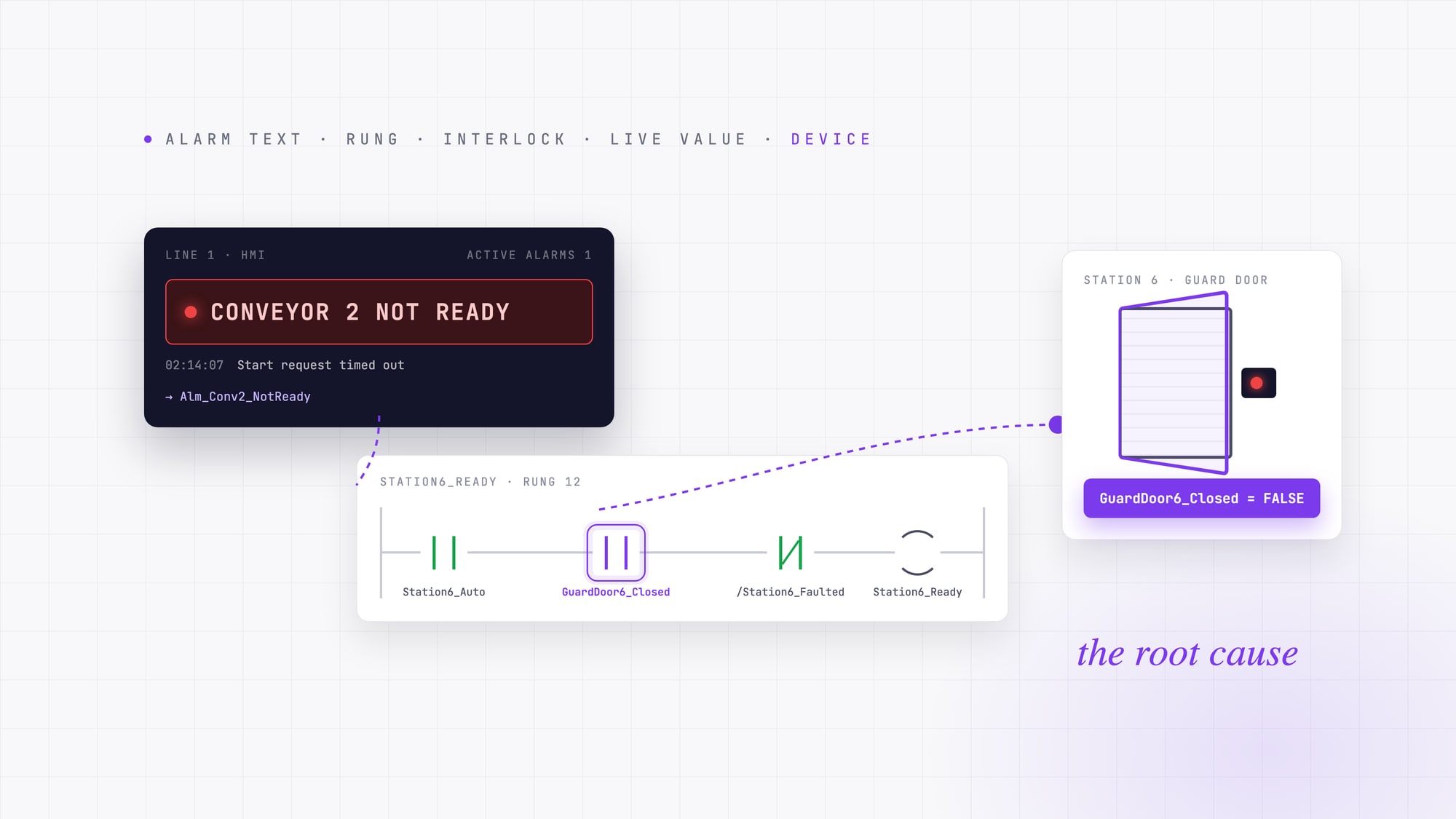
A short example. A conveyor unit shows StateCurrent = 5 (Suspended). By definition, the machine paused because of an external condition, so the first question is not “what is wrong with the conveyor” but “what did the conveyor see upstream or downstream?” Its Status PackTags report the upstream unit as Held (11). The upstream unit’s Held transition was triggered by an internal interlock: a guard door on its infeed. The fault is two machines away from the symptom, and the state model took you there in three reads.
Conveyor: Suspended (5)
  → upstream unit: Held (11)
  → interlock false
  → infeed guard door open
With live runtime values connected, this is a conversation rather than a procedure: ask what is preventing the line from running, and get the chain (Suspended, because upstream Held, because interlock X false, because device Y) with the rung that sets each condition. We cover this in more depth in how to trace a PLC fault code or HMI alarm to its root cause and on the PLC troubleshooting page.
Common PackML mistakes
- 01Treating the vendor’s state-model AOI or function block as the whole implementation.
- 02Checking only the obvious wait states (Stopped, Idle, Aborted, Complete) in mode-change and command guards, and forgetting Held and Suspended.
- 03Using Held when Suspended is meant, which corrupts OEE allocation between machine and line.
- 04PackTags declared but never populated, so the MES reads zeros.
- 05No module hierarchy, so the “unit” is one giant routine.
- 06Writing to the state tag from multiple routines instead of letting the state model own it.
- 07Not recording which parts of the standard were intentionally left out, so the next engineer cannot tell a gap from a decision.
Frequently asked questions
What does PackML stand for?
Packaging Machine Language. It is the name of the OMAC standard for machine state, mode and tag conventions, published by ISA as ISA-TR88.00.02. Despite the name it is used for discrete machinery well beyond packaging.
How many states are in PackML?
Seventeen: Stopped, Resetting, Idle, Starting, Execute, Completing, Complete, Holding, Held, Unholding, Suspending, Suspended, Unsuspending, Stopping, Aborting, Aborted and Clearing. The 17-state model is defined in ISA-TR88.00.02, whose current edition is from 2015.
What is the difference between Held and Suspended in PackML?
Held is a pause caused by a condition inside the machine or by the operator. Suspended is a pause caused by a condition outside the machine, usually upstream starvation or downstream blockage. The machine behaves the same way; OEE accounting does not.
What are PackTags?
The standard tag structure a PackML machine exposes: Command tags (requests into the machine), Status tags (current state, mode, speed, interlocks) and Admin tags (production counts, stop reasons, alarms, time in state). They are usually implemented as controller-scoped UDTs and are what OEE and MES systems read.
Is PackML only for packaging machines?
No. The state model and PackTags apply to any discrete machine that starts, runs, pauses, faults and resets. It is used in food and beverage, pharma, consumer goods, converting, palletizing and assembly.
What is ISA-TR88.00.02?
The ISA technical report that publishes PackML as an implementation example of the ISA-88 standard. It was first published in 2008; the 2015 edition is the current one and is what most implementations of the 17-state model and PackTags follow.
Does PackML work with Allen-Bradley, Siemens and CODESYS?
Yes. Rockwell provides PackML templates and a state-model add-on instruction for Studio 5000; Siemens provides PackML libraries for TIA Portal; CODESYS and other IEC 61131-3 platforms have PackML state-machine function block libraries. The standard is vendor-neutral.
How do I know if my PLC program is PackML-compliant?
Check that the state model is instantiated and actually drives the machine, that all 17 states and transitions are handled, that PackTags exist at controller scope and are populated, that there is an ISA-88 module hierarchy, that modes are implemented, and that alarms drive the Aborting transition. PLCs.ai does this check automatically on an uploaded project and scores each area.
Can AI help implement PackML?
Yes, in a specific way: by recognizing PackML in a project, scoring the implementation against the standard, explaining the gaps, proposing a fix order, and (with human approval) making standards-aligned code changes. Our white paper PackML in the AI Era walks through each step with examples.
Go deeper
The white paper PackML in the AI Era covers the full workflow (automatic recognition, compliance scoring, prioritized remediation, human-approved code changes, shareable reports, and PackML-aware troubleshooting across a production line) with screenshots from a real Allen-Bradley project. It is free and does not require a form.
Or try it on your own machine: upload your PLC project to PLCs.ai and ask, “Is this a PackML project?”
Start a free trial →Read the white paper: PackML in the AI Era →Sources
- 01OMAC, PackML
- 02ISA, ISA-TR88.00.02-2015, Machine and Unit States: An Implementation Example of ANSI/ISA-88.00.01
- 03OPC Foundation, OPC 30050: OPC UA for PackML
More from the blog
PLC fault codes and HMI alarms: how to trace an alarm back to its root cause
A PLC fault code or HMI alarm tells you where troubleshooting starts, not why the machine stopped. A field method for tracing an alarm from its text to the device behind it.
What is the best AI for industrial automation in 2026?
There is no single best AI for industrial automation. Compare industrial AI by the problem it solves, from machine vision to PLC troubleshooting.
PLC documentation software: 9 tools compared (2026).
Automatic PLC documentation ranges from deterministic tools that reformat what is already in the project, to AI that infers meaning from undocumented code, to platforms that generate documentation from a broader understanding of the automation system. Nine real tools, compared on what they actually do.