
Can AI confirm a PLC fault against live tag values?
The project file tells you which conditions gate an output. The live values tell you which one is false right now. How AI combines the two to confirm a PLC fault.
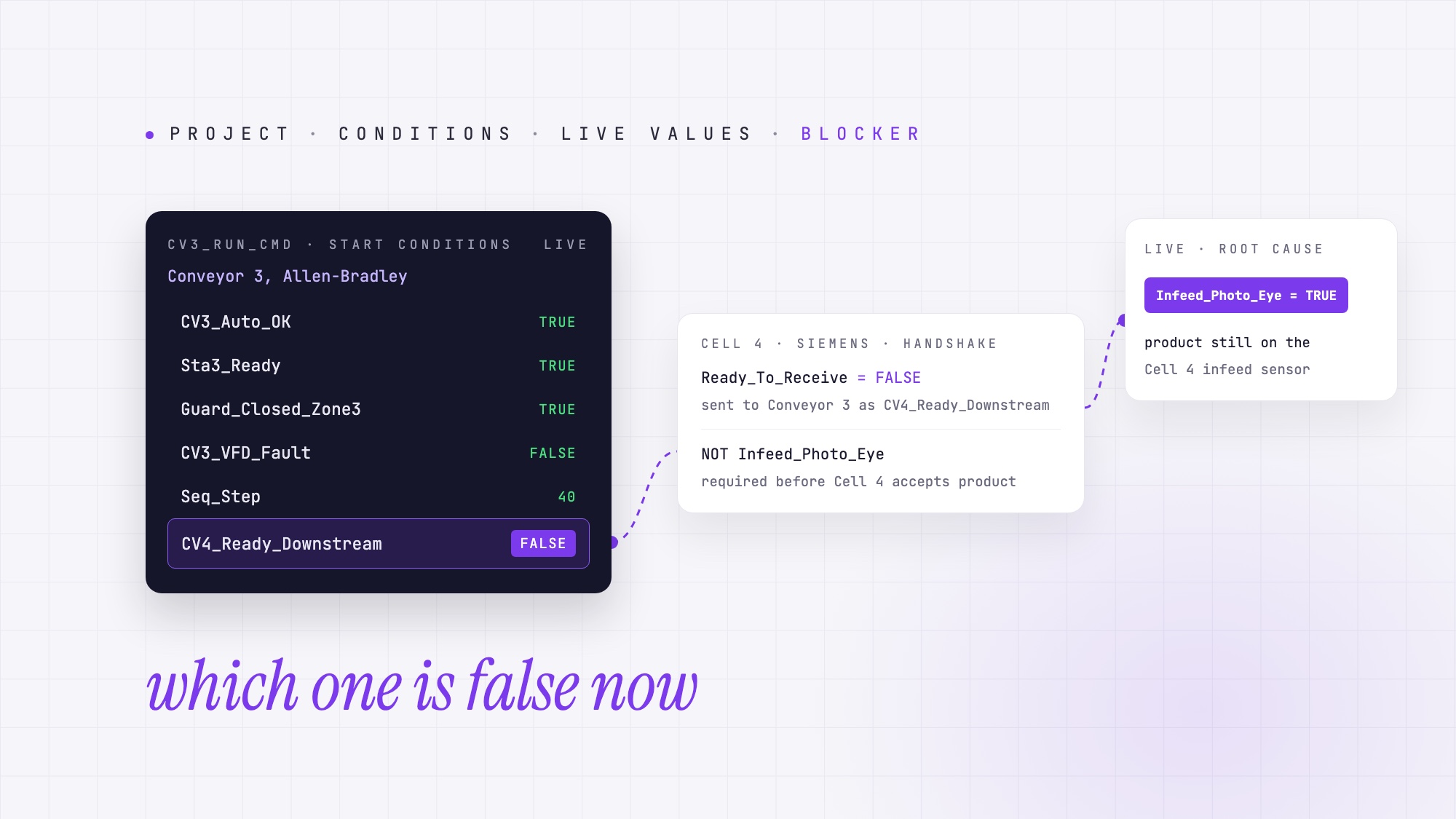
Yes. AI can confirm a PLC fault against live tag values when it understands the complete PLC project and has access to the running controller’s state. PLCs.ai does this by reading the complete PLC project and checking it against live tag values from the running controller, so it can point to the condition that is blocking the machine right now. The project reveals the interlocks, permissives, timers and sequences that control an operation. Live values reveal which conditions are actually preventing it from running.
That distinction matters. It is the difference between identifying five possible causes and knowing which one to investigate first. Reliability standards treat finding the fault as its own phase of repair: IEC 60050-192 lists fault localization and fault diagnosis separately from fault correction. Live values shorten the localization phase.
What a PLC project file tells an AI, and what it cannot
Consider a familiar situation on a manufacturing floor. A conveyor refuses to start. The operator presses Start, but nothing happens. There is no useful alarm on the HMI, and the maintenance technician is called to investigate.
Traditionally, troubleshooting means opening the PLC project, locating the output logic, tracing the conditions that enable it, then going online and watching those tags in the engineering software’s Data Monitor to see which condition is holding the command off.
AI can significantly accelerate the first part of this process. By analyzing the complete PLC project, an AI system can trace the logic backward from the output, identify every permissive and interlock, follow dependencies across routines, and explain the conditions required for the machine to operate. Instead of manually navigating hundreds of rungs, the engineer can ask: “Why isn’t Conveyor 3 starting?” The AI identifies the conditions that must be satisfied and explains how they relate to one another.
But there is an important limitation. The PLC project describes how the machine is designed to operate. It does not tell the AI what is happening inside the controller at this moment. Without live values, the AI might identify five possible blocking conditions. All five are valid explanations, but only one may actually be preventing the conveyor from starting. This is where live tag values change the troubleshooting process.
What changes when live tag values are available?
| Fault scenario | Project-file analysis | What live values add |
|---|---|---|
| Output not energizing | Identifies every condition required to energize the output | Shows which condition is currently unsatisfied |
| Sequence stuck | Explains the sequence steps and transition logic | Identifies the active step and the transition condition preventing progress |
| Timer not completing | Shows the preset, the enable conditions and how the done bit is used | Reveals the accumulated value, enable state and done status |
| Sensor-related fault | Traces where an input is used and what the logic expects | Shows the current input state |
| Intermittent fault | Identifies the conditions that could trigger the fault | Can check the conditions while the fault is present. A fault that clears between reads may be missed |
The underlying logic has not changed. What changes is the AI’s ability to connect that logic to the machine’s actual operating state.
How live tag values reach the AI
To analyze a running controller, the AI needs a way to read its live data. PLCs.ai does this with the Companion App (aka Companion), installed on a computer on the plant’s operational technology (OT) network. Companion communicates with the PLCs, reads the relevant tag values, and streams them to the platform through its Runtime Value Stream feature.
Companion uses an outbound-only connection to the platform. No inbound connection from the cloud into the plant network is required. The connection is read-only: the AI can observe tag values, but it cannot write values, force I/O, or change the controller’s operating mode through Companion. This separation matters in industrial environments, where observing a running process and changing its behavior must remain distinct activities. The live values go to a platform that is SOC 2 Type II audited, so an independent auditor has tested its security controls over time, not just reviewed them on paper.
Reading live tags is only part of the challenge, because a tag value on its own has limited meaning. Knowing that CV4_Ready_Downstream = FALSE is useful, but it does not explain why the signal is false, what equipment it represents, or what needs to happen for it to become true.
To answer those questions, the AI must interpret the value in the context of the PLC project: where the tag originates, how it is calculated, which other conditions influence it, and what equipment depends on it. The real value comes from combining live controller state with a structured understanding of the automation logic.
| Approach | What the AI can do |
|---|---|
| PLC project only | Explain the logic and identify possible causes |
| PLC project + HMI photo | Use visible alarms or status information to narrow the investigation |
| PLC project + live tag values | Evaluate the actual controller state against the logic and identify the currently blocking conditions |
All three approaches can be useful. The difference is how much of the troubleshooting process still requires the engineer to verify the machine’s state by hand. For why that gap matters, see why runtime PLC data multiplies troubleshooting.
A worked example: the conveyor that will not start
Consider a simplified manufacturing line with multiple conveyors and a downstream processing cell. This is an illustrative example, not a customer case. The operator reports: “Conveyor 3 won’t start. There is no alarm on the HMI.” The controls engineer knows that Conveyor 3 should be running, but the motor command is not being issued.
Step 1: AI analysis using the PLC project
The engineer uploads the PLC project and asks the AI why Conveyor 3 is not starting. The AI traces CV3_Run_Cmd and identifies the relevant conditions:
- 01CV3_Auto_OK: automatic operation is permitted.
- 02Sta3_Ready: Station 3 is ready.
- 03CV4_Ready_Downstream: the downstream equipment is ready to receive product.
- 04Guard_Closed_Zone3: the relevant guard is closed.
- 05CV3_VFD_Fault: the drive must not be in a fault condition.
- 06Seq_Step = 40: the sequence must be at the appropriate step.
The AI can explain the complete logic and identify the conditions that must be satisfied. But without live values, it cannot determine which condition is currently blocking the start. The technician still needs to inspect the running logic, the HMI or the physical equipment.
Step 2: Add live controller values
Now consider the same question with live tag values available. The AI evaluates the current conditions against the project logic:
| Condition | Live value | Evaluation |
|---|---|---|
| CV3_Auto_OK | TRUE | Satisfied |
| Sta3_Ready | TRUE | Satisfied |
| Guard_Closed_Zone3 | TRUE | Satisfied |
| CV3_VFD_Fault | FALSE | No drive fault |
| Seq_Step | 40 | Correct step |
| CV4_Ready_Downstream | FALSE | Blocking condition |
The AI can now identify the immediate reason the conveyor is not starting. But the investigation does not have to stop there. The downstream-ready signal originates in another controller, a Siemens PLC responsible for Cell 4. With both projects available, the AI follows the handshake between the Allen-Bradley and Siemens controllers. It finds that Ready_To_Receive in the Siemens program is false because Infeed_Photo_Eye remains active. The physical cause is a product still occupying the downstream infeed sensor.
Step 3: The technician acts
Instead of investigating every interlock on Conveyor 3, the technician receives a specific explanation:
Conveyor 3 is waiting for the downstream-ready signal from Cell 4. The Cell 4 infeed photoeye is active, preventing the downstream controller from asserting Ready_To_Receive. Check for product obstructing the infeed sensor.
The technician checks Cell 4, finds the product, and clears the obstruction following the site’s safety procedures. The next evaluation shows that the downstream-ready condition has been restored.
The difference in the AI’s answer
| Without live values | With live values |
|---|---|
| “Conveyor 3 requires automatic mode, Station 3 ready, the downstream-ready signal, the guard-closed signal, no VFD fault, and sequence step 40. Check these conditions to identify the blocker.” | “Conveyor 3 is blocked by the downstream-ready handshake from Cell 4. The Siemens controller is holding Ready_To_Receive false because the infeed photoeye is active. Inspect the Cell 4 infeed.” |
The first answer is technically useful. It saves the engineer from manually tracing the logic. The second answer goes further. It connects the logic to the actual state of the equipment and directs the investigation toward a specific cause. This is the transition from AI-assisted code understanding to AI-assisted fault diagnosis, and it is what AI for PLC troubleshooting should deliver.
It is also where multi-controller understanding becomes especially valuable. A fault that appears in one PLC may originate in another controller, another machine or an entirely different vendor’s automation system. For more on this challenge, see faults that cross controllers.
Which AI tools can read live PLC tag values?
Most general-purpose AI tools used for PLC troubleshooting work with exported project files, pasted code or documentation. Some specialized industrial AI platforms can also access live controller values through OPC interfaces, vendor gateways or dedicated connectors.
PLCs.ai reads the complete Studio 5000, TIA Portal or CODESYS V3 project, traces the fault through interlocks and permissives, and, where a live connection is in place, confirms the root cause against live tag values through the read-only, outbound-only Companion App. It never writes to the PLC. See how it fits a maintenance workflow on the PLC troubleshooting page.
The important distinction is not simply whether an AI tool can display a tag value. It is whether it can interpret that value against the complete automation logic. When evaluating AI troubleshooting tools, several questions are worth asking.
Checklist for evaluating live-data AI tools
| Question | Why it matters | PLCs.ai |
|---|---|---|
| Is live access read-only? | Prevents the diagnostic connection from changing controller behavior | Yes |
| Is communication outbound-only? | Avoids requiring inbound cloud access to the OT network | Yes |
| Is the platform SOC 2 Type II audited? | Live plant data should go only to a cloud whose security controls an independent auditor has tested over time | Yes |
| Are values interpreted against the complete PLC project? | Provides engineering context rather than isolated tag readings | Yes |
| Can it trace logic across multiple controllers and vendors? | Faults frequently originate outside the controller reporting the symptom. Cross-controller analysis needs the relevant projects and access to the signals involved | Yes |
| Can it work without a live connection? | Not every plant permits connectivity | Yes |
| Can answers reflect the user’s engineering or maintenance role? | Different users need different levels of technical detail | Yes |
A useful evaluation question is: “If the downstream-ready signal is false, can the AI explain why it is false, including the logic in the controller that generates it?” That question reveals considerably more about a platform than asking whether it supports live tag monitoring.
What if live PLC data is not available?
Not every plant can provide live access to its controllers. Some facilities restrict OT connectivity. For many, the question is where the data goes. PLCs.ai is SOC 2 Type II audited, and Companion only reads tag values and sends them out over an outbound-only connection, which gives IT and OT security teams specific controls to review. Others operate legacy controllers that lack modern network interfaces. In some situations the machine is offline, the controller is unreachable, or the organization has not yet approved the Companion App.
AI troubleshooting can still provide value in these environments. The complete PLC project remains a powerful source of engineering information. An AI system can trace interlocks, identify permissive chains, explain sequence transitions, and determine which conditions must be checked to diagnose a problem.
The technician can also provide additional observations, such as an HMI alarm message, a photograph of the operator screen, or manually recorded tag values. These help narrow the investigation, although they do not provide the same visibility as a live connection. For example, an HMI alarm may indicate that a conveyor failed to start within the expected time. The AI can trace the alarm logic backward to the conditions that would cause that alarm to activate. It may not know which condition is currently false, but it can explain where to look and why.
See our articles on tracing an HMI alarm to its root cause and troubleshooting without the IDE. The important point is that live data extends AI troubleshooting. It is not a prerequisite for using AI to understand and investigate PLC logic.
How this differs from predictive maintenance and anomaly detection
The term real-time AI diagnostics is often associated with predictive maintenance. Predictive maintenance systems analyze equipment behavior over time, using information such as vibration, temperature, current consumption and operating patterns. Their objective is often to detect abnormal behavior or predict an impending failure before equipment stops. AI troubleshooting with PLC logic and live tag values addresses a different question.
Predictive maintenance asks what might fail next. PLC fault diagnosis asks why the machine is not running now.
A predictive maintenance system might detect that a conveyor motor is developing an abnormal vibration pattern. A PLC troubleshooting system might identify that the same conveyor is not starting because a downstream-ready permissive is false. Both capabilities are valuable, and both can contribute to reducing downtime, but they rely on different information and serve different stages of the maintenance process.
Frequently asked questions
Can AI diagnose faults in a running PLC in real time?
Yes, when the AI understands the PLC project and has access to live controller values. It can evaluate current conditions against the logic and identify which interlocks, permissives or sequence conditions are blocking an operation. Live tag monitoring is not the same as monitoring every PLC scan: visibility depends on how often values are read, communication latency and which signals are available. Very short or intermittent faults can come and go between reads, so a single reading may miss them.
Does AI need live PLC data to troubleshoot?
No. AI can analyze a PLC project without connecting to the running controller. It can identify the complete logic chain, explain possible causes and guide the technician through verification. Live data adds the ability to evaluate those conditions against the current controller state.
Is the connection to the PLC read-only?
Yes. The PLCs.ai Companion App is read-only and uses outbound-only communication with the platform. It cannot write tag values, force I/O or change controller operating modes. The platform receiving the data is SOC 2 Type II audited.
Which PLC platforms does PLCs.ai support?
PLCs.ai analyzes Studio 5000 / Allen-Bradley, TIA Portal / Siemens and CODESYS V3 projects, and the Companion App streams live tag values from all three platforms today. Live coverage keeps expanding, so ask the team about other controllers.
What if my plant will not allow a connection?
You can still use project-file analysis to investigate faults. Providing an HMI alarm message, a photograph of the operator screen or manually observed values helps the AI narrow the possible causes without a live connection.
Can AI follow a fault into another vendor’s PLC on the same line?
Yes, provided the relevant PLC projects are available and the AI can identify the relationships between their signals. With live access to the required values, it can evaluate conditions across controllers. This is particularly useful for handshakes, upstream and downstream permissives, and line-level sequences.
How is this different from predictive maintenance?
Predictive maintenance looks for patterns that may indicate future equipment failures. PLC fault diagnosis analyzes the control logic and current controller state to explain why an operation is not proceeding as expected.
Is my PLC project data used to train AI models?
No. PLCs.ai does not use customer project data to train AI models. Learn more about data protection and privacy.
This runs on your own project
Every manufacturing environment is different. The interlocks, sequences, equipment relationships and operating conditions that matter are defined by your actual PLC programs. PLCs.ai brings together project understanding and live controller values to help engineers move from possible causes to actionable answers.
Try it on your own project, start a free trial →More from the blog
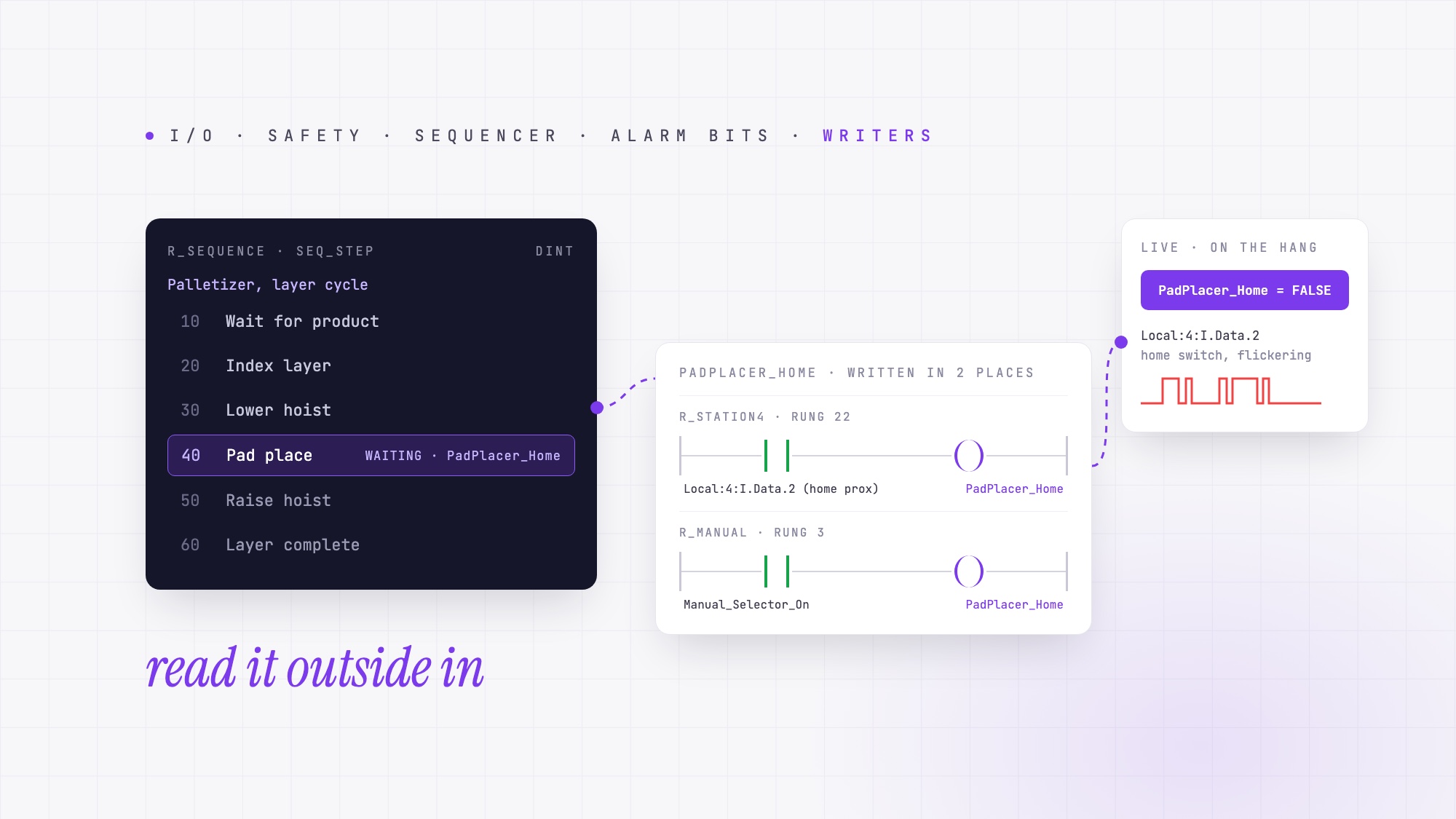
How do I understand an undocumented PLC program I inherited?
The engineer who wrote it is gone, the comments were never written, and the machine still has to run. A working order for inherited PLC programs, and what AI can trace for you.
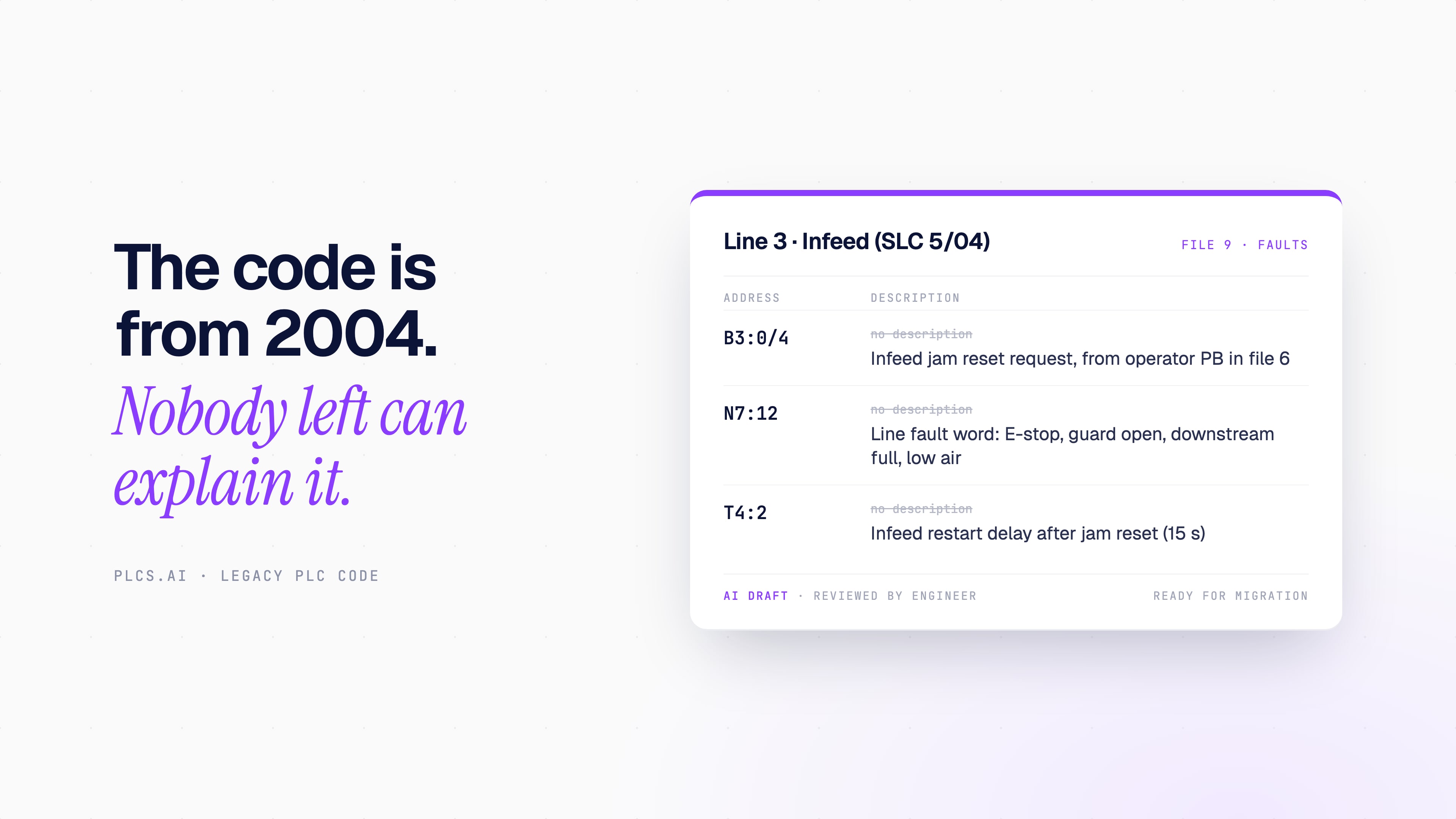
AI for legacy PLC code: understand, document and migrate programs nobody wants to touch
Can AI understand, comment or convert old PLC programs? What it does well on RSLogix 500, PLC-5 and S7-300 code, what the vendor tools still do, and what still needs an engineer.
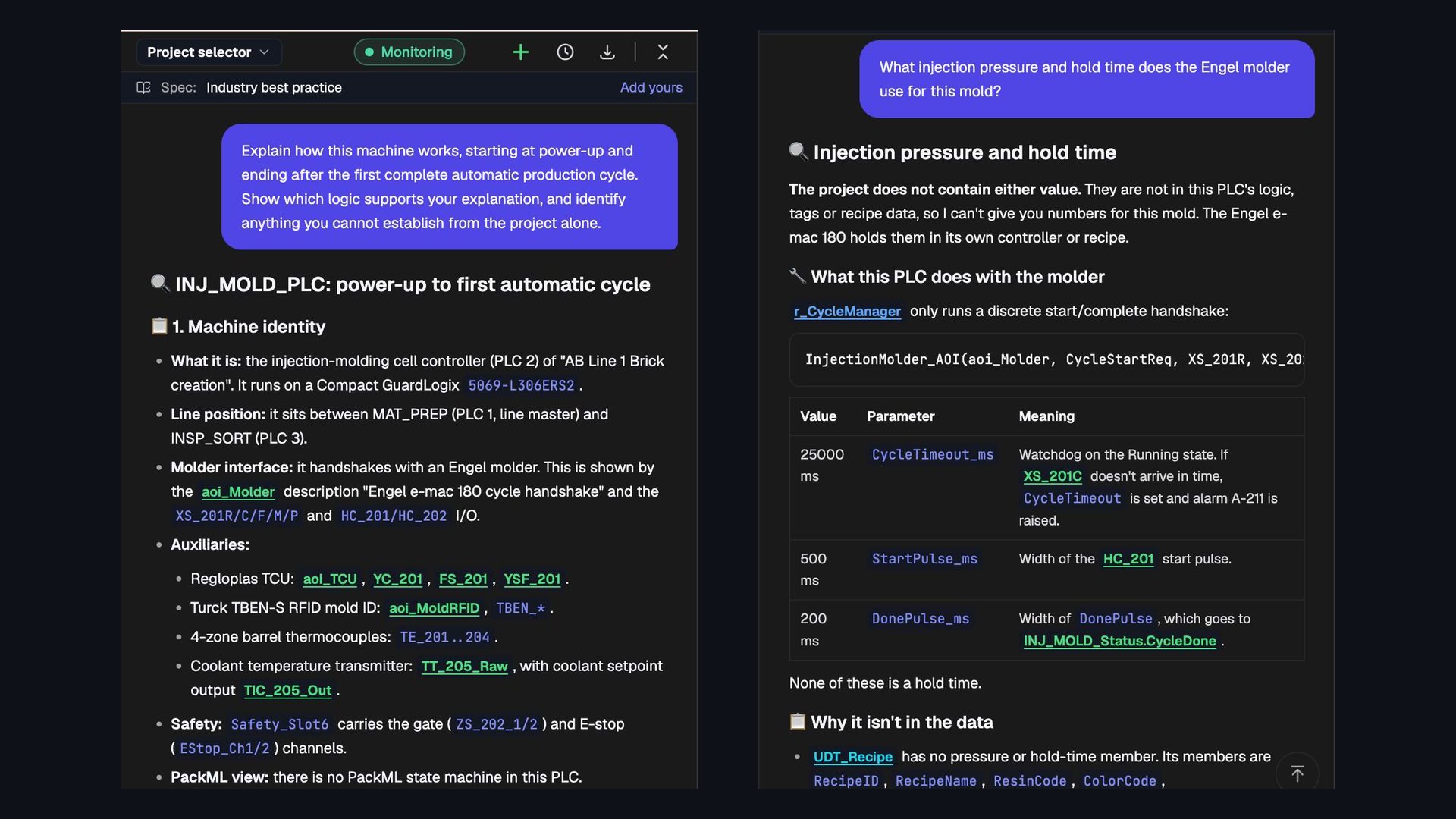
Can AI read an entire PLC project and explain how the machine works?
We asked PLCs.ai to explain an Allen-Bradley injection-molding cell from power-up to its first automatic cycle. What whole-project understanding looks like, and seven ways to test it.