
Can AI read an entire PLC project and explain how the machine works?
We asked PLCs.ai to explain an Allen-Bradley injection-molding cell from power-up to its first automatic cycle. What whole-project understanding looks like, and seven ways to test it.
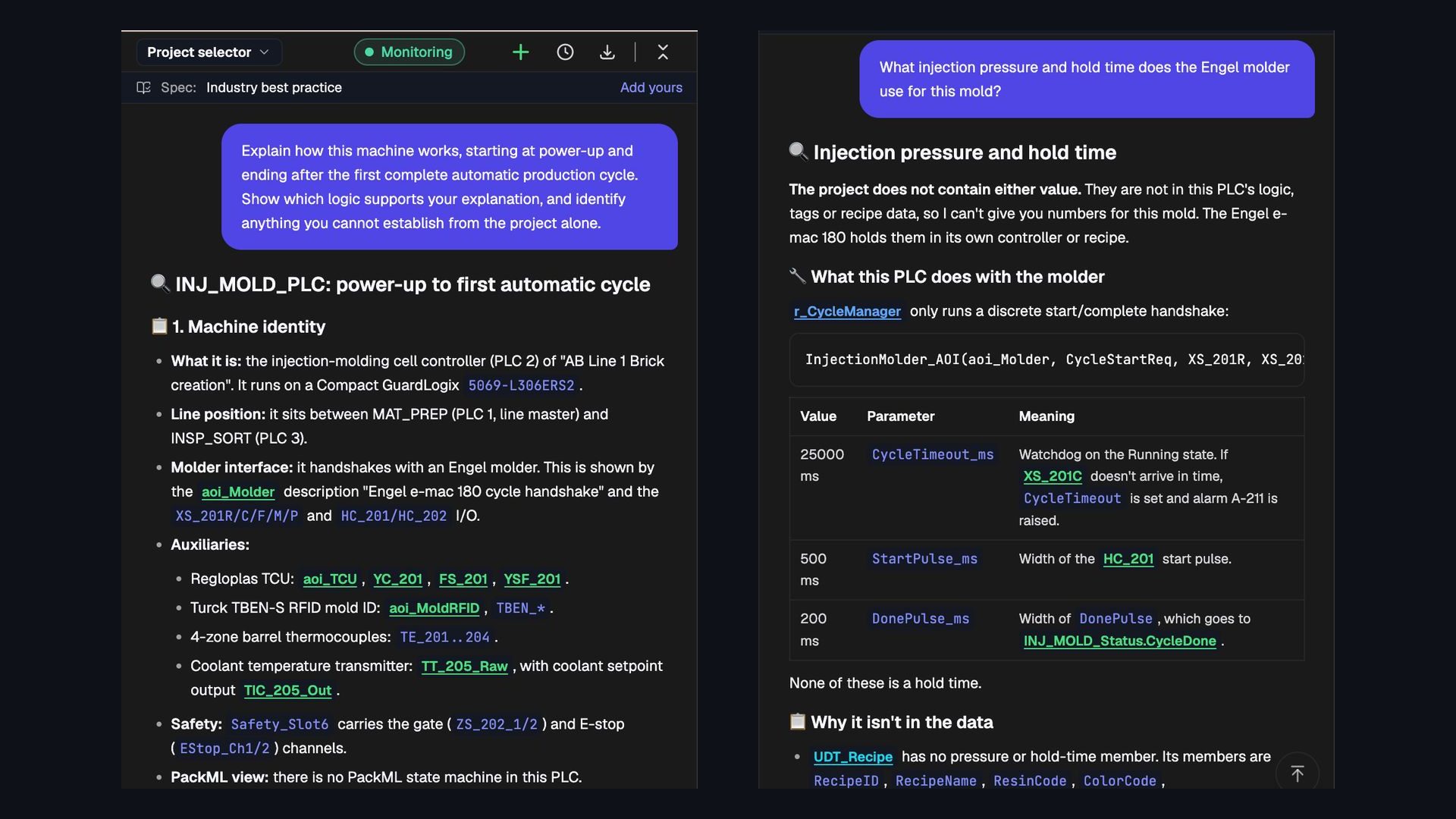
Short answer: yes. AI built for PLC engineering can read a complete project and explain how the machine is meant to run, across programs, routines, tags, Add-On Instructions and interlocks, not one rung at a time. But the test is not whether the explanation sounds right. It is whether every step points back to logic you can check, and whether the AI says plainly what the project cannot tell it.
Imagine being asked to troubleshoot a cell you have never seen. The controls engineer who wrote it has moved on. You have a Studio 5000 project and little documentation. Before you touch anything, you need to answer a deceptively simple question: how does this machine work?
Traditionally, you open the project, find the main routines, follow tag references, trace permissives and sequence logic, and slowly build a mental model. We wanted to see whether AI could do the same, so we asked PLCs.ai. Customer projects stay private, so we used a complete Studio 5000 project our controls experts built to production standards for a three-PLC line. The screenshots below are its answer, unedited.
What does “the entire PLC project” mean?
A Studio 5000 project is more than a collection of ladder diagrams. It can include controller and program-scoped tags, tasks, programs, routines, Add-On Instructions (AOIs), user-defined data types, alarm logic, safety logic and references between all of them, written in ladder, structured text or function block diagram.
A single output might be commanded in one routine, enabled by conditions built in another, inhibited by a fault somewhere else and sequenced by a fourth. Reading only the output rung is not enough to explain why the machine starts, stops or refuses to run.
Whole-project understanding means reconstructing those relationships, not summarizing each routine on its own. It also means recognizing when the answer lives outside the project: drive parameters, HMI configuration, electrical drawings, a separate safety controller, another PLC, or the live values on the running controller.
The machine: an injection-molding cell on a three-PLC line
The project is the cell controller for PLC 2 on a three-PLC line that molds plastic bricks. It runs on a Compact GuardLogix 5069-L306ERS2 and sits between a material-preparation PLC, which is the line master, and an inspection-and-sorting PLC downstream. It handshakes with an Engel injection molder and manages a Regloplas temperature control unit, a Turck RFID reader that identifies the mold, four barrel thermocouples and a coolant temperature transmitter. Gate and E-stop safety logic runs in its own safety task.
We gave PLCs.ai one question:
Explain how this machine works, starting at power-up and ending after the first complete automatic production cycle. Show which logic supports your explanation, and identify anything you cannot establish from the project alone.
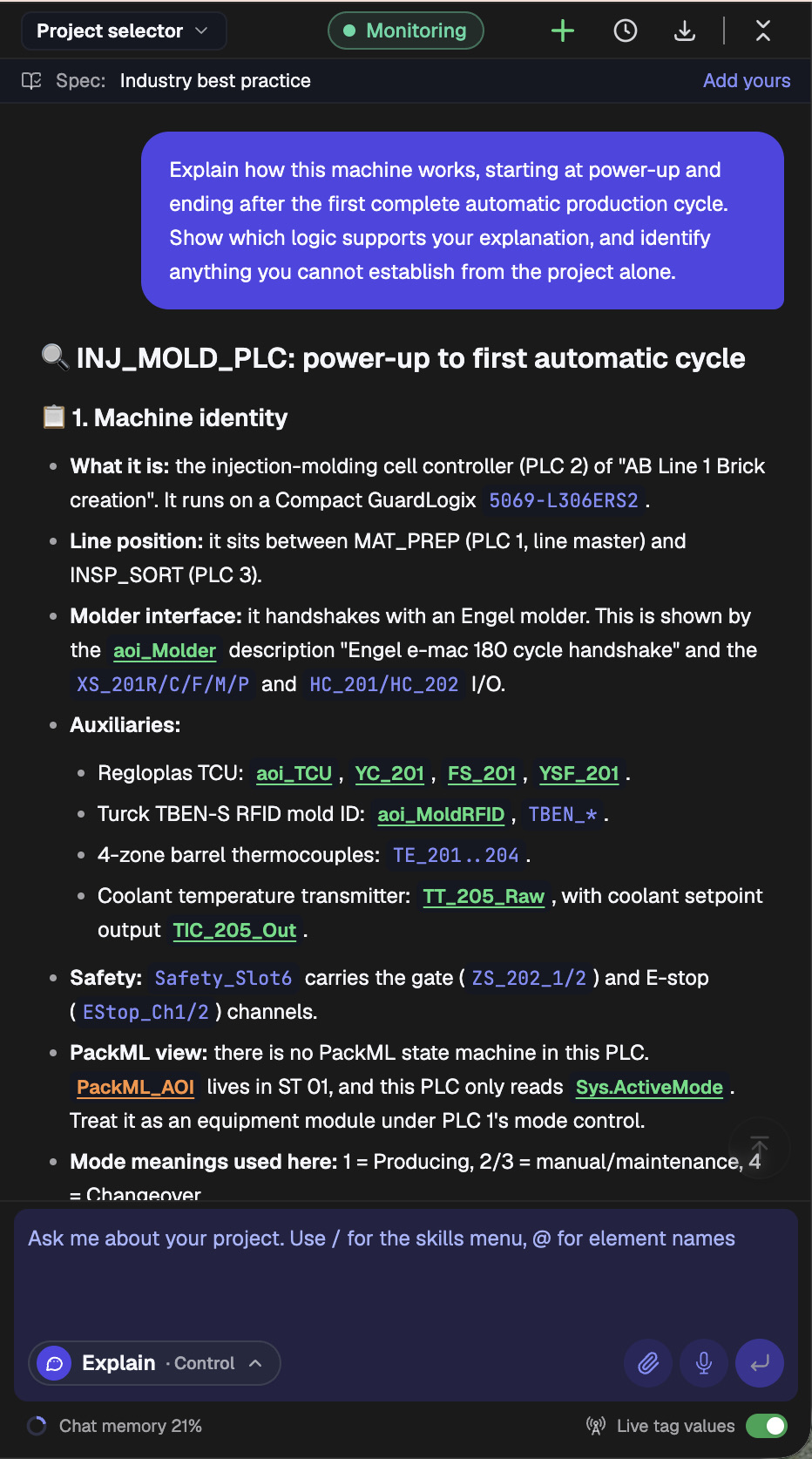
The answer took about two minutes and cited 14 locations in the project. It was given in the Control Engineer style (the “Explain · Control” setting at the bottom of each screenshot), which is why it speaks in routines and tag names. Here is what it reconstructed, and why each part matters.
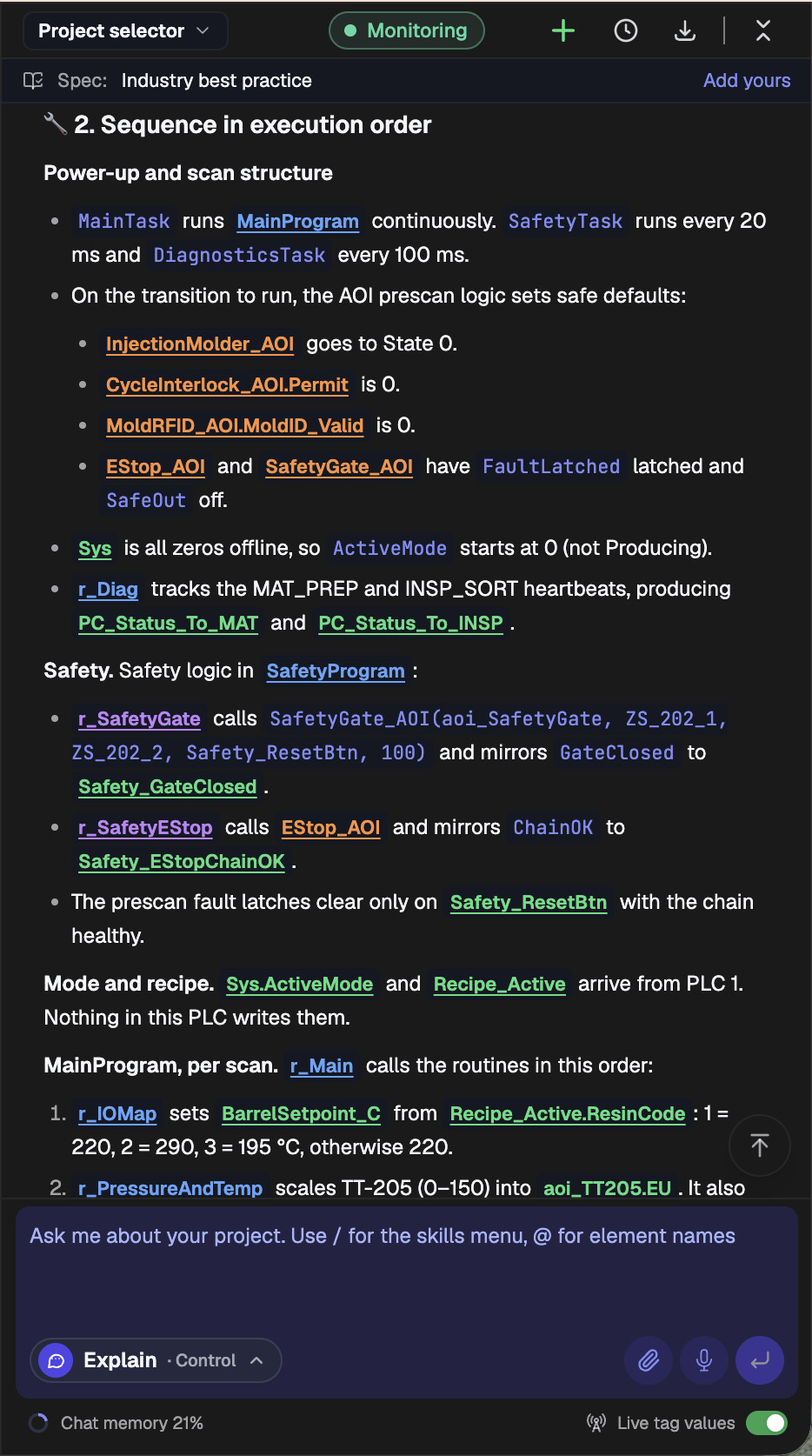
Power-up: what the controller does before anything moves
PLCs.ai started where a controls engineer would, with the task structure. MainTask runs MainProgram continuously, SafetyTask runs every 20 ms and DiagnosticsTask every 100 ms. On the transition to run, the AOI prescan logic sets safe defaults: the molder AOI goes to state 0, the cycle-interlock permit and the mold-ID-valid flag are 0, and the E-stop and safety-gate AOIs latch their faults with the safe output off. Those latches clear only on the safety reset button with the chain healthy.
That distinction matters. Not every bit resets the same way at power-up, and an AI that assumes they do will tell you the machine is ready when it is not. A useful answer says which values are set, where, and what it takes to clear them.
Readiness: 18 permissives behind one cycle interlock
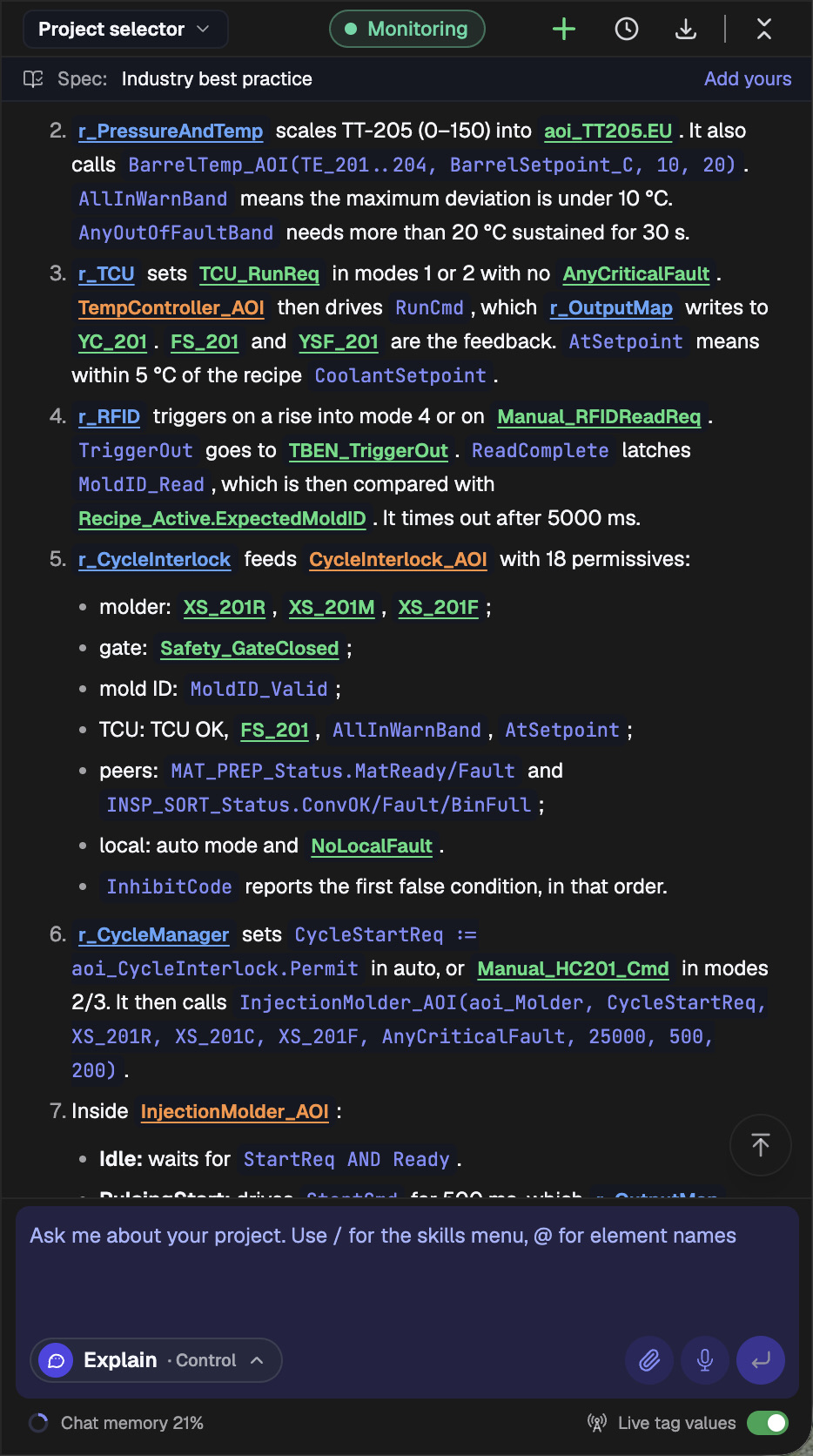
Before the molder can cycle, r_CycleInterlock feeds an interlock AOI with 18 permissives: the molder’s own signals, the closed safety gate, a valid mold ID, the temperature control unit running and at setpoint with the barrel zones inside their band, the upstream PLC’s material-ready and fault status, the downstream PLC’s conveyor, fault and bin-full status, auto mode, and no local fault. An InhibitCode reports the first false condition, in order.
This is the part a rung-level assistant misses. The permit depends on two other PLCs, a temperature unit, an RFID reader and the safety logic, each handled in a different routine. Reading the molder rung alone would never tell you why it refuses to start.
It also kept the project and the live machine apart. From the project alone, AI can establish which 18 conditions are required. It cannot say which one is false right now. That takes live tag values.
The cycle: from start request to the first complete part
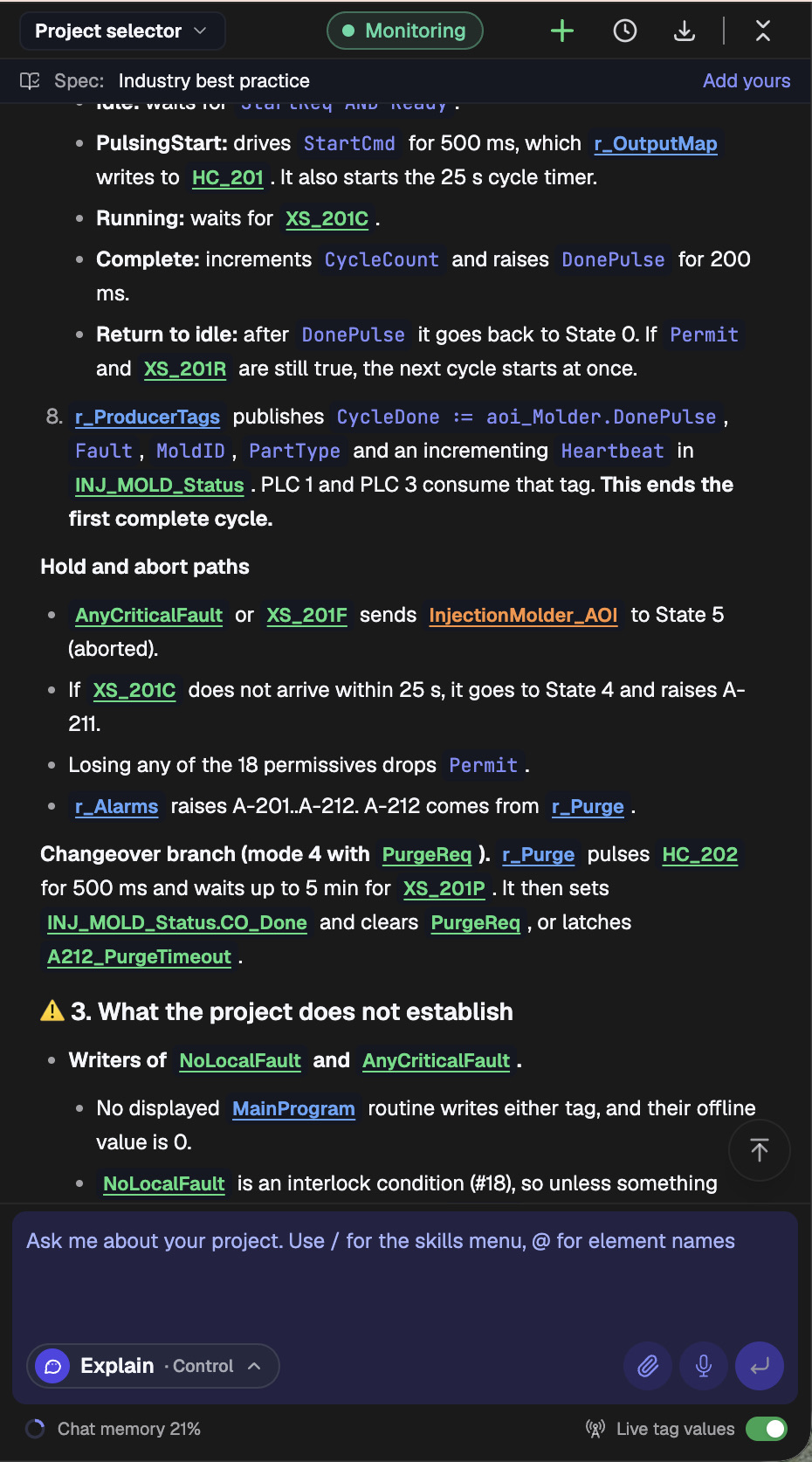
r_CycleManager sets the cycle start request from the interlock permit in auto mode, or from a manual command in the manual modes, and calls the molder AOI. Inside it, Idle waits for a start request and the molder’s ready signal. PulsingStart drives the start output for 500 ms and starts a 25-second cycle timer. Running waits for the molder’s cycle-complete signal. Complete increments the cycle count and raises a done pulse for 200 ms. The AOI then returns to idle, and if the permit and molder-ready are still true, the next cycle starts at once.
r_ProducerTags then publishes the cycle-done bit, fault, mold ID, part type and a heartbeat in a status tag that PLC 1 and PLC 3 consume. That is where the answer ends the first complete cycle: at the handoff to the rest of the line, not inside this controller.
It also covered what happens when the cycle does not go to plan. A critical fault or a molder fault aborts the sequence. If cycle-complete does not arrive within 25 seconds, the AOI holds and raises alarm A-211. Losing any of the 18 permissives drops the permit. A separate changeover branch pulses a purge output and waits up to five minutes for confirmation before latching a timeout alarm. None of this comes from how injection molders usually behave. It comes from this project.
What the project could not tell it
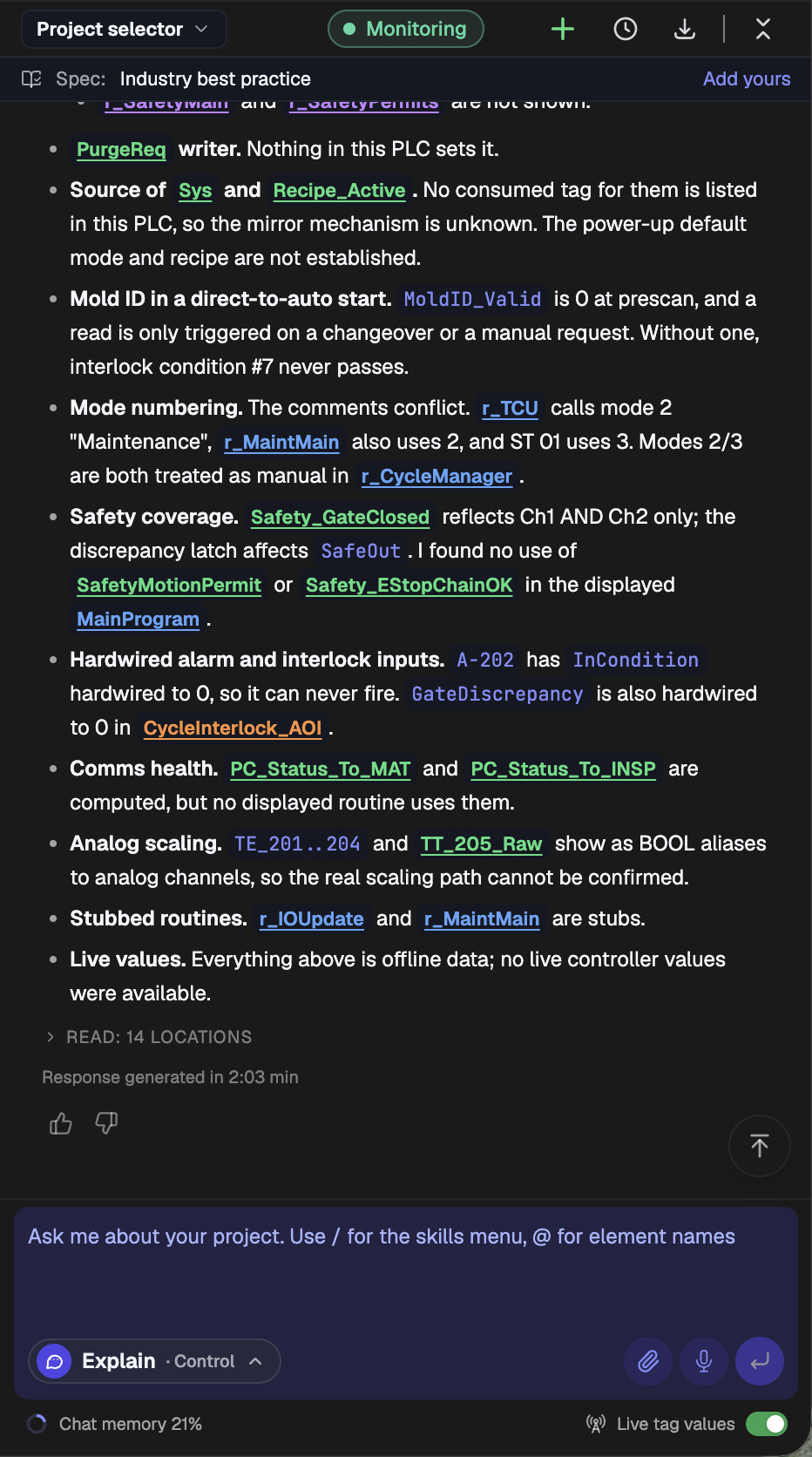
The most useful part of the answer was the last section. PLCs.ai listed what it could not establish, and several items are things an engineer inheriting this machine would want to know on day one:
- 01Two tags that gate the cycle, NoLocalFault and AnyCriticalFault, are not written by any MainProgram routine it read.
- 02Nothing in this PLC sets the purge request, and the mode and recipe arrive from PLC 1 by a mechanism the project does not show, so the power-up mode and recipe are not established.
- 03On a direct start in auto, the mold ID is never read, because a read only happens on changeover or a manual request. Without one, permissive 7 never passes.
- 04The comments disagree on mode numbering: one routine calls mode 2 maintenance, another uses mode 3.
- 05Alarm A-202 has its input hardwired to 0, so it can never fire. A gate-discrepancy input inside the interlock AOI is hardwired to 0 as well.
- 06Two communication-health tags are computed but never used, and two routines are empty stubs.
- 07The thermocouple and coolant inputs show as BOOL aliases to analog channels, so the real scaling path cannot be confirmed.
- 08Everything in the answer is offline project data. No live controller values were available.
A fluent narrative would have hidden all of this. Left unknown, these are exactly the gaps that turn into a 2 a.m. call.
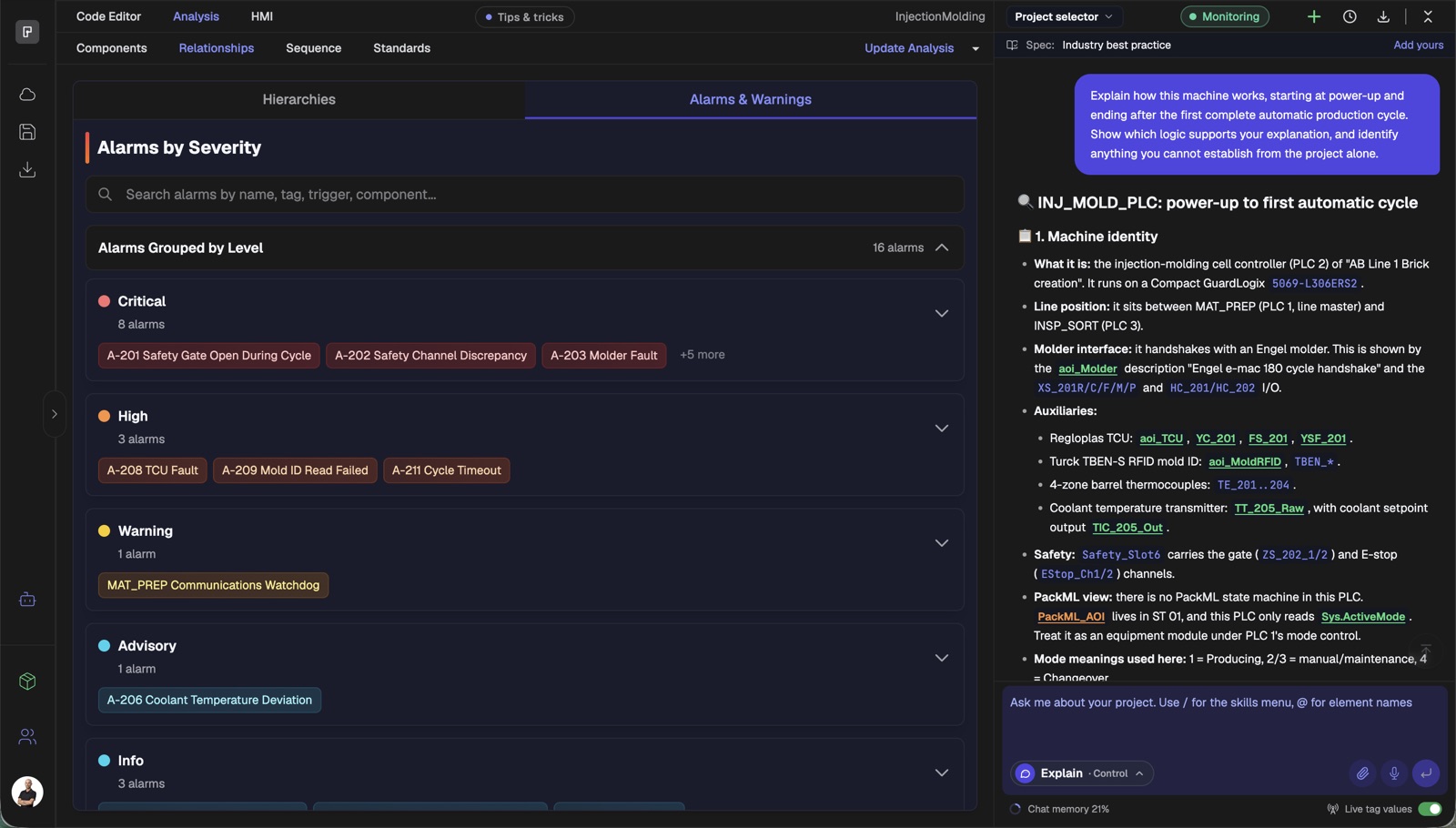
PLCs.ai’s analysis view shows the other side of one of those findings. It lists the project’s 16 alarms by severity, with A-202 Safety Channel Discrepancy among the critical ones. The chat answer is what tells you that A-202’s input is hardwired to 0, so that critical alarm can never fire.
With live values: why it will not start right now
The offline answer could say which conditions the cycle needs. It could not say which one is false. So we connected live tag values and asked a second question: “The machine is in auto mode but will not start a cycle. What could be preventing it, in the order you would check?”
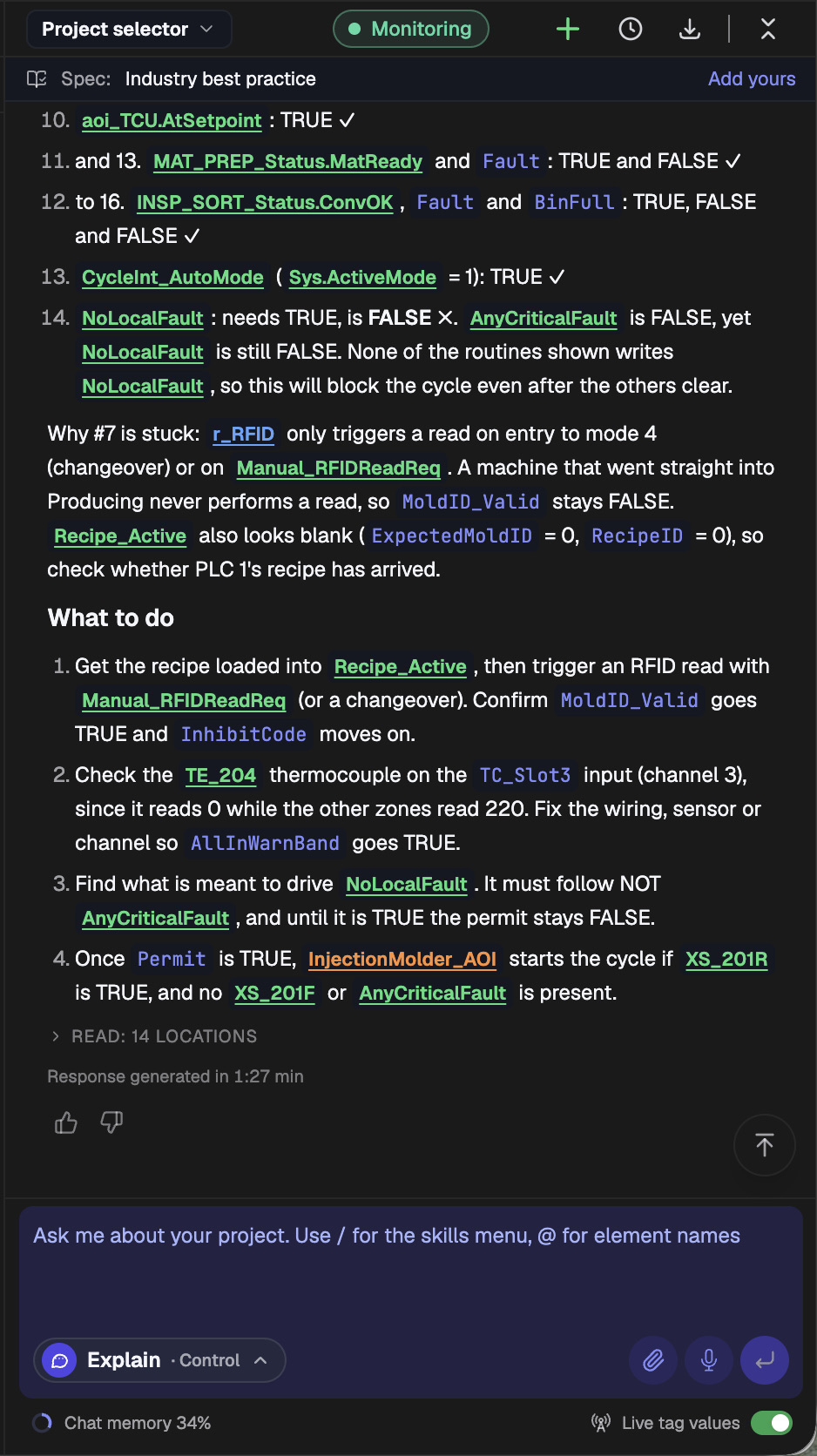
The answer led with the blocker: the interlock is stopped at InhibitCode 7, mold ID not valid. It then walked through all 18 permissives in check order, with the state each one needs and its live value, and found two more failing behind it: barrel thermocouple TE_204 reads 0 against a 220 °C setpoint, and NoLocalFault is FALSE.
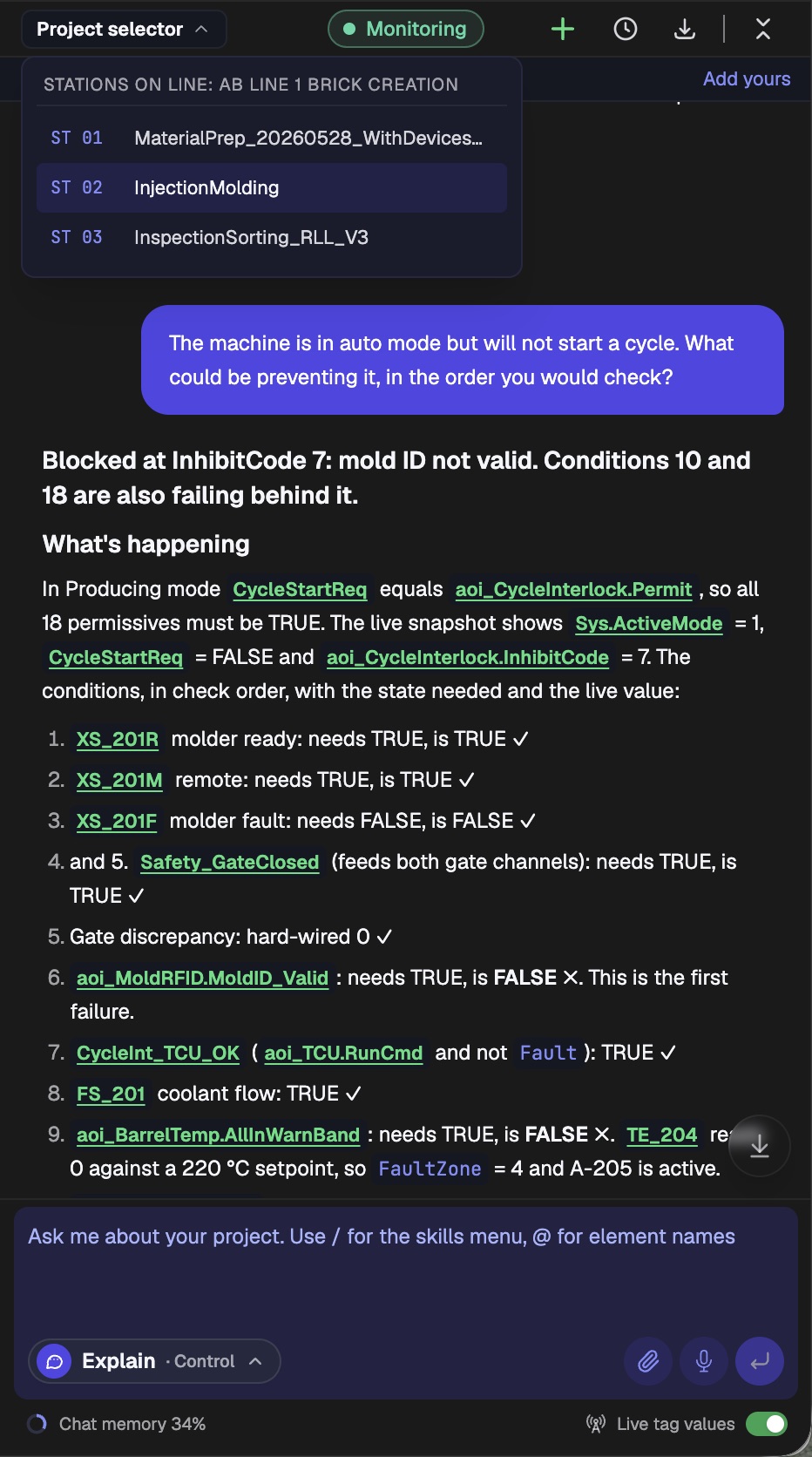
Two of those three were already flagged in the offline answer: the mold ID read that never happens on a direct start in auto, and the NoLocalFault tag that no routine writes. Live data turned “this could block the cycle” into “this is blocking the cycle now.” The answer closed with four steps, in order, to get the machine running.
The same question, answered for each role
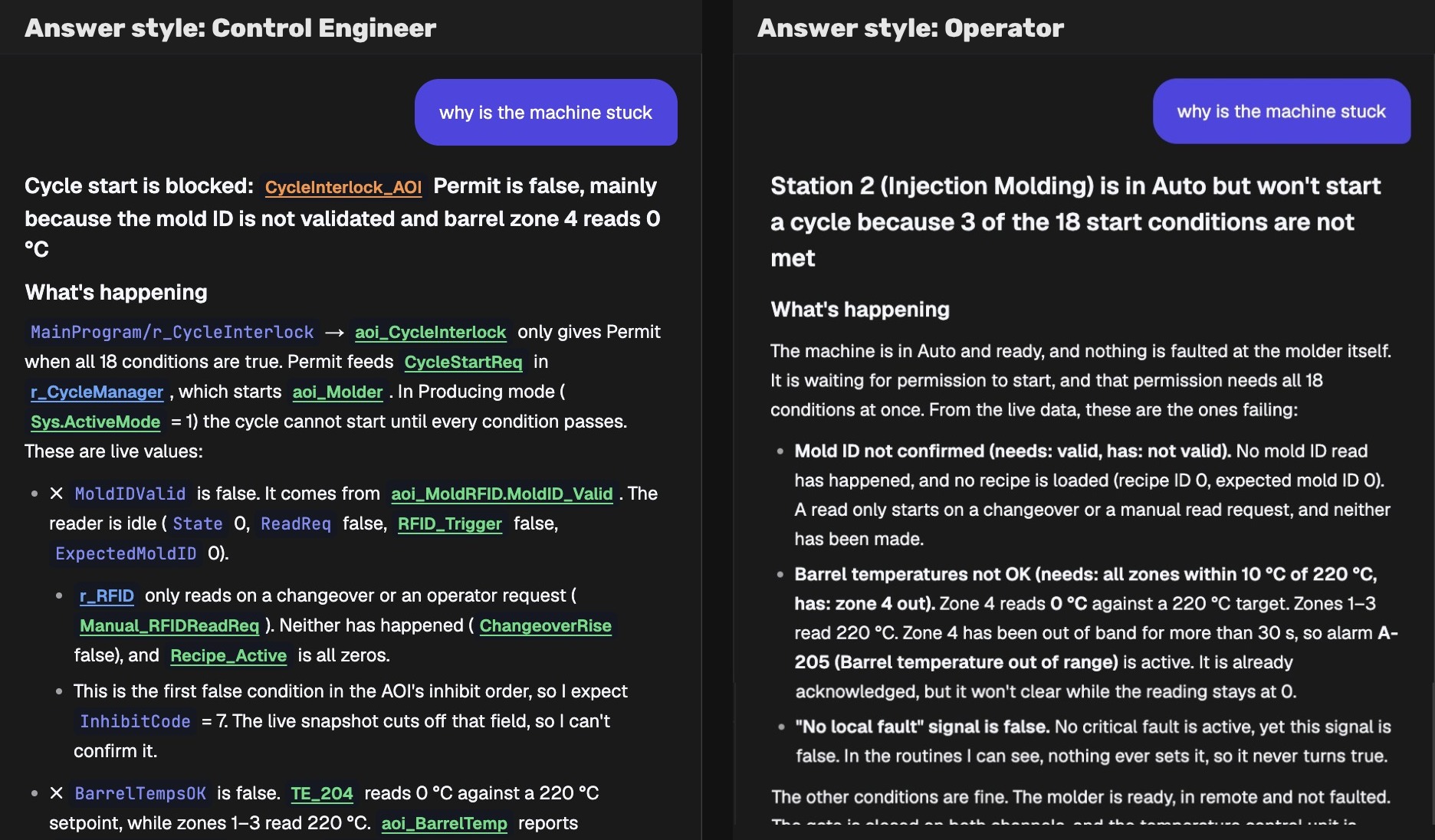
Every answer above was written for a controls engineer. In PLCs.ai, the reader’s role is part of the question. Asked by a maintenance engineer, the same “will not start” question leads with the physical fault: barrel zone 4 reads 0 °C, so check the thermocouple and its wiring first. Asked by an operator, it explains in plain language what the machine is waiting for, which steps they can handle themselves, and what to hand to maintenance.
Same project, same live data, same 18 permissives. Only the depth and the language change, so the person standing at the machine gets an answer they can act on. We show the roles side by side in AI PLC troubleshooting for maintenance teams without the IDE.
What a credible AI answer should show
A fluent explanation is not enough. Engineers need to inspect the evidence behind it. For each significant conclusion, a credible answer identifies:
- 01The program or routine that contains the logic.
- 02The tags and conditions involved, including where they are written and where they are read.
- 03The sequence step or state transition, if there is one.
- 04Any interlock, permissive, timeout or fault path that changes the behavior.
- 05Whether the conclusion comes straight from the code, is inferred from names and structure, or depends on information the project does not contain.
This is also where the quality and order of context matter. The current project logic must not be quietly overridden by a generic programming convention, an older revision, or a guess based on a tag name. Industry practice helps interpret code, but it is not evidence of what this controller is programmed to do. That ordering is what we call automation context.
Seven tests: does the AI really understand the whole PLC project?
If you are evaluating an AI tool for PLC analysis, ask these seven questions on a project you know well.
| Test | Ask the AI | What to verify |
|---|---|---|
| 1. Coverage | “What parts of this project did you analyze, and what could you not process?” | Supported files, languages, routines, AOIs and exclusions are explicit. |
| 2. Structure | “Show the programs and routines responsible for the automatic cycle.” | The map matches how the project is actually organized. |
| 3. Cross-references | “Where is the conveyor run command written, and what reads it?” | References are complete and correctly classified. |
| 4. Sequence | “Explain the cycle from ready state to completion.” | Transitions follow the actual code, not a generic machine template. |
| 5. Dependencies | “What can prevent this axis or cylinder from moving?” | Permissives, inhibits, faults and modes are identified. |
| 6. Traceability | “Show the logic supporting each key conclusion.” | Every claim can be checked against routines and tags. |
| 7. Uncertainty | “What can’t you know without live data or other documentation?” | The AI separates offline logic, assumptions and real operating conditions. |
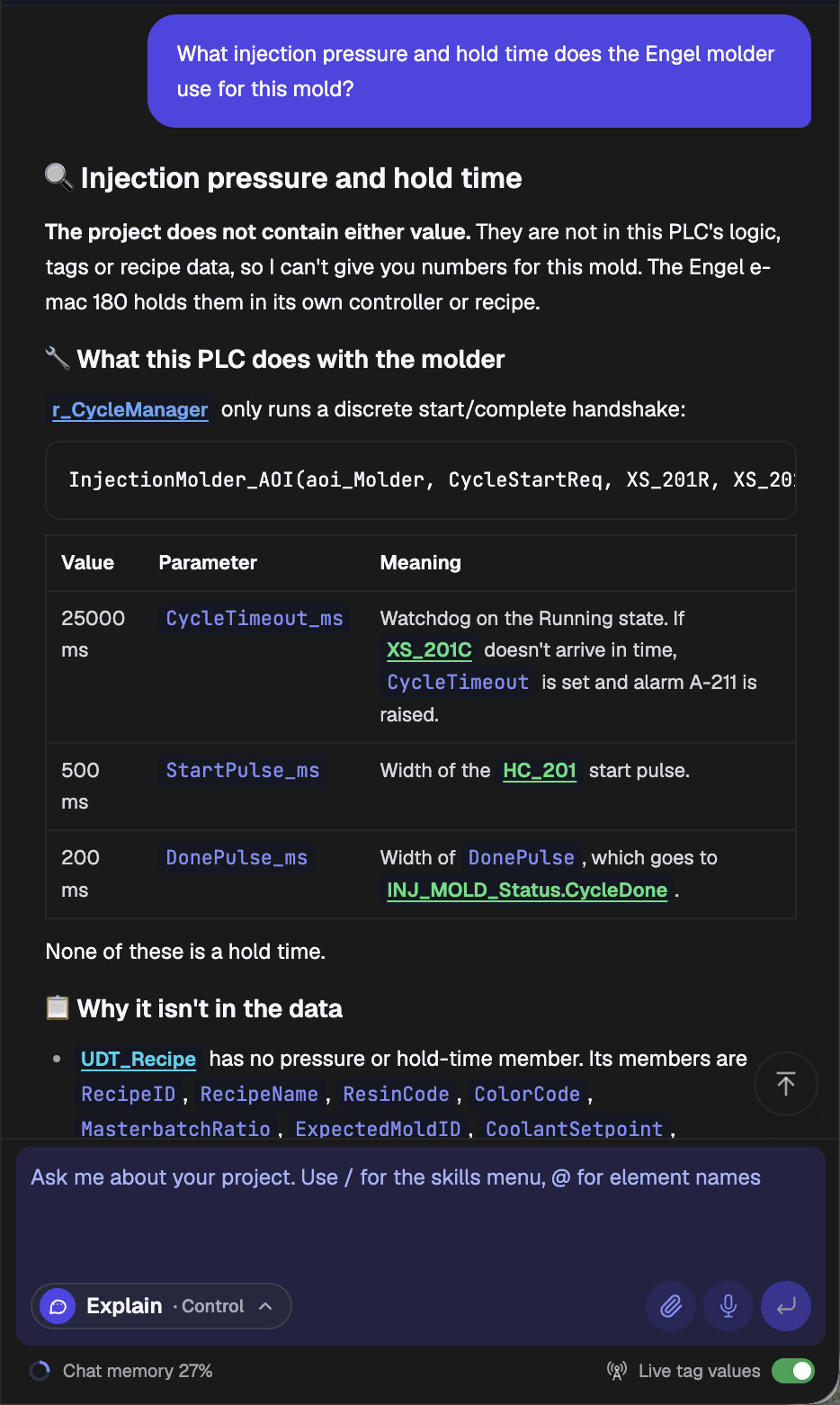
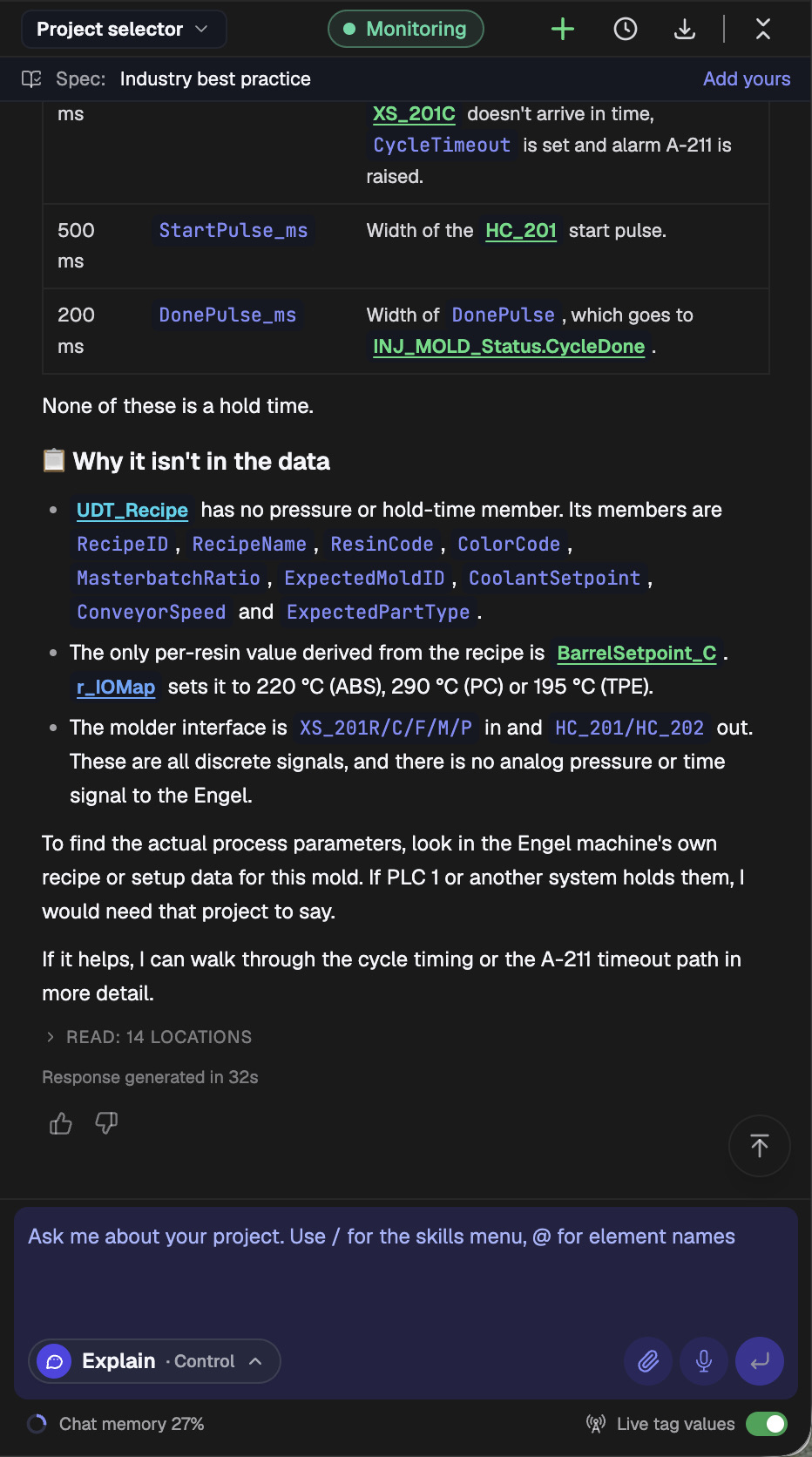
The strongest test is adversarial: ask a question whose answer you know is not in the PLC project. We asked PLCs.ai what injection pressure and hold time the Engel molder uses for this mold. Those values live in the molder, not the PLC. PLCs.ai said so directly: the project does not contain either value. It showed why, since the recipe data type has no pressure or hold-time field and the molder interface is only discrete start and complete signals, and it pointed to the Engel machine’s own recipe as the place to look.
Can ChatGPT analyze an entire Allen-Bradley PLC project?
A general-purpose model can explain PLC concepts and interpret code you give it. Depending on the file, the tools available and the size of the project, it may also help with parts of a Studio 5000 export. But being able to accept a file is not proof of reliable whole-project understanding.
A real project brings practical problems: keeping the relationships between routines and tags intact, resolving indirect references and aliases, handling several languages and custom data types, knowing which version is authoritative, and grounding every answer in the source logic. Pasting in more text does not solve those on its own. We compare the two approaches in more detail in PLCs.ai vs. pasting your PLC files into ChatGPT.
So the useful question is not “can this AI read ladder logic?” (it can). It is “can this system reconstruct and back up behavior across the whole project, and be explicit about its blind spots?”
What AI cannot learn from the PLC project alone
Even a thorough offline analysis has limits. A project describes the intended control behavior, but on its own it cannot confirm:
- 01Whether a sensor is on or a motor is actually running right now.
- 02Whether the program in the controller matches the offline project being analyzed.
- 03How external drives, robots, HMIs or other controllers behave when their configurations are not available.
- 04Wiring, mechanical changes or field modifications that never made it into the project.
- 05How safety functions implemented outside the analyzed logic are designed or validated.
- 06Whether the programmed sequence is safe and appropriate for a particular machine, without engineering validation.
Some of these gaps close with live data: with live tag values from the Desktop Companion App, the question changes from “which conditions are required?” to “which condition is false right now?” Others close with context you add, covered next. Whatever remains is a reason to use AI as an engineering aid, not an unquestioned source of truth. Any change that affects equipment behavior should still go through review, testing and the site’s change-control process.
Adding the context the project does not contain
Every gap in the answers above has the same cause: the information lives somewhere other than the PLC project. Live tag values close some of those gaps. Most of the rest close with context the people on the plant floor already have.
In PLCs.ai, that context comes in three forms:
- 01Photos from the floor. A technician or engineer can photograph an HMI alarm screen, a nameplate, a panel or whatever is visibly blocking the machine, attach it to the chat and ask about it. The AI reads the image alongside the project.
- 02Machine information and documents. Manuals, diagrams, specs and other reference documents go into your organization’s knowledge base, so every question is answered against them, for the whole team rather than one chat session.
- 03Your own standards. Answers follow industry best practice by default (the “Spec” bar at the top of each screenshot), and you can add your own coding standards and approved patterns.
In this example, the Engel setup sheet for this mold is exactly what the injection-pressure question needed. A photo of the alarm screen showing A-205, or of the TE_204 terminal, puts the physical evidence next to the logic.
One rule from earlier still applies: added context helps interpret the project, it does not override it. When a document and the running logic disagree, the answer should say so.
How PLCs.ai approaches whole-project understanding
PLCs.ai reads complete Studio 5000, TIA Portal and CODESYS V3 projects and answers questions in plain English, with references to the routines and tags behind each conclusion, as in the answer above. It reasons across every PLC on a line, which matters for a cell like this one, whose permit depends on its neighbors upstream and downstream. It confirms causes against live tag values from the Desktop Companion App, and any code change it proposes is simulated and reviewed before it is saved.
Answers draw on the project itself, live tag values, what you add (photos, documents and your own standards) and general industrial engineering knowledge. They are not treated as interchangeable, and when a question depends on something none of them contains, the answer says so.
For an engineer inheriting an unfamiliar machine, the goal is not to replace careful commissioning or controls expertise. It is to cut the time spent discovering how the logic is organized, where the critical dependencies live and what to check next. For the wider picture, see what PLC AI is and the three generations of AI for PLC work.
Try it on your own project, start a free trial →Frequently asked questions
Can AI explain a complete ladder logic program?
Yes, if it is built to process the whole project. Project-aware AI can connect behavior across routines, tags and AOIs instead of explaining rungs one at a time. How complete the answer is depends on the file format, what the project contains and whether the system resolves cross-references. Ask for source references and explicit coverage limits.
Can AI read an Allen-Bradley L5X file?
Yes. An L5X file is the XML export format from Studio 5000, and software built for it can extract the project structure and logic it contains. An L5X export is not a complete picture of every connected device or of the running machine.
Can AI identify PLC interlocks and permissives?
Yes. It can locate and explain the interlock and permissive logic in the project, such as the 18 permissives behind the cycle interlock above. Engineers should verify the traced conditions, and remember that external safety systems and device-level inhibits may not be visible.
Can AI explain why a machine will not start?
From an offline project, AI can list the programmed conditions that would prevent a start. Knowing which condition is blocking the machine right now requires current tag values. PLCs.ai reads those from the Desktop Companion App.
Can AI automatically document an existing PLC project?
Yes. AI can describe routines, tag relationships and operating sequences. Generated documentation should be checked against the project and kept current as the code changes.
Does whole-project understanding mean the AI can safely change PLC code?
No. Understanding existing logic and proposing a change are separate capabilities. Any proposed change needs engineering review, simulation or testing where available, and the plant’s normal approval and deployment controls.
The real test is not whether AI can read the code
The real test is whether it can turn a complex, interconnected control program into a verifiable explanation of how the machine is meant to work.
For the engineer opening an unfamiliar Allen-Bradley project, that means going beyond isolated rung descriptions to a coherent picture of initialization, readiness, sequencing, dependencies, fault handling and cycle completion. Just as important, it means knowing where the explanation ends and where evidence from the physical machine is still required.
That is the standard whole-project PLC understanding should be measured against.
More from the blog
AI PLC Troubleshooting for Maintenance Teams Without the IDE
Most people who need PLC answers never open Studio 5000 or TIA Portal. How role-based AI gives operators and maintenance teams answers they can act on.
PackML explained: the state model, PackTags, and where AI fits
What PackML is, how the 17-state machine, modes and PackTags work, how to check whether a PLC project really follows it, and where AI helps.
PLC fault codes and HMI alarms: how to trace an alarm back to its root cause
A PLC fault code or HMI alarm tells you where troubleshooting starts, not why the machine stopped. A field method for tracing an alarm from its text to the device behind it.