
PLC documentation software: 9 tools compared (2026).
Automatic PLC documentation ranges from deterministic tools that reformat what is already in the project, to AI that infers meaning from undocumented code, to platforms that generate documentation from a broader understanding of the automation system. Nine real tools, compared on what they actually do.
Yes, software can automatically document PLC code. PLCs.ai, one of the nine tools compared here, reads a complete Studio 5000, TIA Portal or CODESYS V3 project and generates tag descriptions, rung comments, routine summaries and a control narrative across every controller on the line. But automatic PLC documentation is not a single capability.
One tool may turn ladder logic into natural-language rung comments. Another may summarize routines and function blocks. More advanced platforms can reconstruct sequences, dependencies, and operating behavior from an entire PLC project, or use context across multiple controllers to explain how a production system works.
So the important question is not simply whether a tool generates PLC documentation, but how much of the automation system it understands when generating it.
As of September 2026, PLC documentation software broadly ranges from deterministic tools that organize information already contained in an engineering project, through AI tools that infer meaning from PLC code, to context-aware platforms that generate documentation from a broader understanding of the automation system.
Why PLC documentation software exists
PLC documentation has traditionally depended on the engineer who wrote the code.
In a well-maintained project, tags are descriptive, routines are commented, sequences are documented, and changes are reflected in the engineering documentation. In the real world, plants inherit projects written over many years by different employees, OEMs, and system integrators. Comments become outdated, modifications accumulate, and sometimes the only person who really understands why a piece of logic exists is the engineer who worked on it years ago.
That becomes particularly costly as experienced controls engineers retire or leave a facility. The PLC keeps running the machine, but part of the knowledge required to understand it leaves with them.
How PLCs.ai turns documentation into a byproduct of the code, not a chore after it →Automatic PLC documentation attempts to reconstruct and preserve that knowledge. But there is an important distinction between documenting code and understanding what the code controls.
What does automatic PLC documentation actually mean?
“Generates PLC documentation” is often treated as a yes-or-no feature. It shouldn’t be. Consider a simple piece of logic:
Motor_Start = Auto_Mode AND Safety_OK AND NOT Motor_Fault
Software could generate:
Motor_Start is enabled when Auto_Mode and Safety_OK are true and Motor_Fault is false.
That statement is accurate, but it has added very little engineering knowledge. It has essentially translated the logic into English. A more useful explanation would identify which motor is being controlled, what establishes Safety_OK, which conditions create Motor_Fault, what sequence requires the motor, and what upstream or downstream equipment depends on it.
Both outputs could reasonably be called “automatically generated PLC documentation.” They are not equivalent.
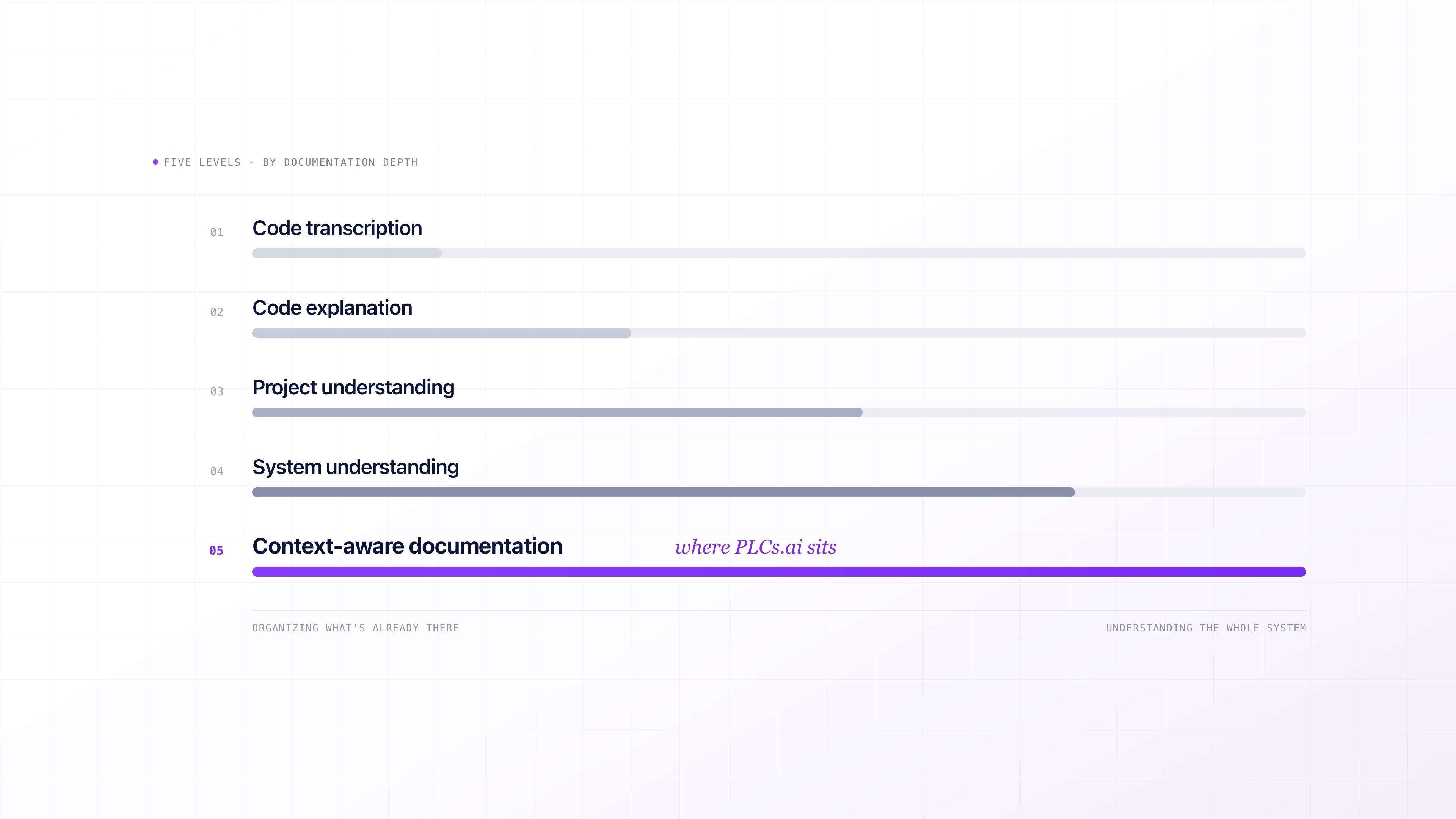
Five levels of PLC documentation depth
- 01Level 1, code transcription. The software organizes or translates information already contained in the PLC project: tag descriptions, rung comments, block listings, I/O lists, formatted representations of the source code. Useful for poorly formatted or hard-to-navigate projects, but it is describing what is already explicit.
- 02Level 2, code explanation. The system interprets individual pieces of PLC logic and explains what they appear to do. Instead of just displaying a rung, network, AOI, or function block, AI produces a natural-language description of its apparent purpose. This is where most AI-assisted documentation tools begin.
- 03Level 3, project understanding. Documentation starts to reflect relationships across the complete PLC project: dependencies between routines, tags, AOIs, or function blocks, sequences and interlocks, and how different parts of the control application work together. This is where documentation moves toward functional descriptions and control narratives.
- 04Level 4, system understanding. A production machine or line rarely consists of one isolated program. At this level, documentation incorporates relationships between multiple controllers and equipment, potentially from different vendors. The question changes from what does this routine do to how does this equipment interact with the rest of the production process.
- 05Level 5, context-aware documentation. PLC code is only one source of engineering truth. Plant standards, machine documentation, previous project versions, engineering conventions, and runtime information can all change the meaning of what appears in the source code. At this level, documentation becomes an output of a broader automation understanding, not a translation of an isolated file.
What can PLC documentation software produce?
Depending on its depth and available context, PLC documentation software can produce very different engineering artifacts: rung and network comments, tag and I/O descriptions, routine and function-block summaries, dependency and cross-reference information, sequence-of-operation descriptions, control narratives, alarm and interlock documentation, cause-and-effect relationships, project-level reports, and documentation spanning multiple controllers or equipment.
Some tools extract information that already exists. Others infer missing descriptions. More advanced systems combine both, and the distinction matters. An extracted tag description comes directly from the engineering project. An inferred description represents the software’s interpretation of undocumented logic. A generated control narrative may combine hundreds of extracted and inferred relationships into a new engineering document. Good PLC documentation software should make those distinctions clear.
Three approaches to PLC documentation software
- 01Documentation and engineering tools extract, organize, and present information already in the PLC project. Their major advantage is determinism: if a comment or interface exists in the project, the system can reproduce it reliably. The limitation is that missing engineering knowledge cannot be recovered simply by reformatting what remains.
- 02AI-assisted documentation infers meaning that was never explicitly documented, by examining tag names, logic patterns, cross-references, and program structure. Particularly valuable for legacy applications, but generated prose alone does not guarantee engineering understanding. Quality depends heavily on how much code and context the AI can reason over.
- 03Context-aware documentation treats documentation as one output of an automation-understanding system, built from the project, its components, dependencies, and, where available, related controllers, project history, engineering standards, and runtime information. The same context used to produce a control narrative can also answer engineering questions, investigate faults, and support future changes.
PLC documentation software compared
A simple “AI documentation: yes or no” column is not particularly useful. When evaluating PLC documentation software, look at these axes side by side.
| Tool | Documentation approach | PLC/project scope | Infers undocumented intent | Project relationships | Multi-controller context | Runtime context | Typical output |
|---|---|---|---|---|---|---|---|
| Schneider EcoStruxure Control Engineering – Documentation (formerly PLC DocGen) | Deterministic extraction | Multi-vendor PLC/PAC (IEC 61131-3) | No | Program-level (dependency trees) | To verify | No | Flowcharts, dependency trees, project metrics |
| Code2Docu (third-party TIA Portal add-in) | Deterministic extraction | TIA Portal project | Limited / No | No (per-block/object only) | No | No | Structured docs (HTML/DocX/PDF) per function/FB/UDT |
| Siemens Eigen Engineering Agent | AI engineering agent | Siemens/TIA Portal | Yes | Yes | To verify | No | Contextual explanation, natural-language project queries |
| FactoryTalk Design Studio Copilot (Rockwell) | AI engineering assistant | Rockwell / FactoryTalk Design Studio project | Yes | Project context | To verify | To verify | Explanation / code generation and assistance |
| Copia AI | AI-generated documentation from source-control context | Multi-vendor project repositories | Yes | Yes | To verify | No | Comments, summaries, project documentation |
| Software Defined Automation Factory Agent | AI + industrial DevOps | Multi-vendor (Siemens, Rockwell, Mitsubishi confirmed) | Yes | To verify | To verify | To verify | Natural-language documentation, version-to-version change summaries |
| PLC-Wizz | AI PLC assistant (RAG over project codebase) | Siemens, Rockwell/Allen-Bradley, ABB, Beckhoff, Omron | Yes | Implied / to verify | To verify | To verify | Searchable project documentation, code generation |
| PLCflow (vendor undisclosed) | AI-assisted PLC engineering | Rockwell Studio 5000 / Allen-Bradley ControlLogix/CompactLogix | Yes | Tag/naming consistency (not logic relationships) | No | No | AI comments, code health scoring, AI diff summaries |
| PLCs.ai | AI documentation from whole-project and line context | Studio 5000, TIA Portal, CODESYS V3; every controller on the line | Yes | Yes | Yes | Yes, live tag values via the Desktop Companion App | Tag descriptions, rung comments, routine summaries, control narratives, line-level documentation |
Verified September 2026 against vendor sites, press releases, and public product documentation for each tool. The remaining “to verify” cells reflect capabilities the vendor’s own public materials don’t disclose either way, not a gap in this comparison.
How should PLC documentation quality be evaluated?
The easiest mistake is evaluating documentation by volume. A 50-page automatically generated document isn’t necessarily more useful than a five-page one. Instead, take a section of PLC logic your engineering team already understands and ask each system to document it, then evaluate the result against five questions.
- 01Did it merely restate the code?
- 02Did it correctly identify what the logic is intended to accomplish?
- 03Did it understand dependencies elsewhere in the project?
- 04Did it reconstruct the operating sequence or equipment behavior?
- 05Did it use information beyond the immediate code to improve its explanation?
That is a far more meaningful test than asking whether a product has an “automatic documentation” feature.
Can AI document PLC code automatically?
Yes. PLCs.ai does it from the whole project, not one rung at a time: upload the project and it drafts descriptions, comments and narratives for an engineer to review, marked as inferred where the logic does not prove them.
Still, AI-generated PLC documentation should be treated as engineering assistance, not engineering proof. Modern AI systems are particularly useful when descriptive tag names, recognizable programming patterns, cross-references, and complete AOI or function-block definitions provide enough context to infer intent. The task gets harder when projects contain generic tags, undocumented indirect addressing, missing AOIs or function blocks, inconsistent conventions, or incomplete source files.
A plausible but incorrect engineering description can be more dangerous than an obvious absence of documentation.
Safety-related logic deserves particular caution. An automatically generated description can help an engineer navigate and understand safety logic, but generated documentation should never be treated as validation that a safety function is correct or compliant.
Which PLC documentation software is right for a running plant?
The answer depends on what you expect the documentation to accomplish. If the objective is a formatted handover package from a well-documented project, deterministic documentation tools may be sufficient. If the problem is thousands of rungs of legacy logic with missing comments, AI-assisted code explanation becomes considerably more valuable. If the objective is to preserve automation knowledge, understand dependencies, troubleshoot production, and keep documentation connected to the system as it evolves, project and system context become increasingly important.
That distinction is central to the approach taken by PLCs.ai. The platform does not treat documentation as a separate translation task: it first builds an understanding of the PLC project and its automation context, and documentation is one output of that understanding, alongside natural-language explanation, dependency analysis, troubleshooting, and engineering assistance. For environments with multiple controllers, that context extends beyond a single PLC project to how controllers interact as part of the production system.
Bring a real project and see what level of documentation it produces, no commitment required →How do you choose PLC documentation software?
Before selecting a tool, give it real automation code rather than a prepared demonstration project, and check whether it can ingest the formats actually used in your plant, including Studio 5000, TIA Portal, and CODESYS where relevant. Then look beyond whether it successfully produces a document: ask what evidence supports its explanations, whether it understands references outside the immediate routine, whether it can follow a sequence across programs or recognize relationships between controllers, what information leaves your network, and whether the output can be exported into the formats your document-control process requires.
Most importantly, ask an experienced controls engineer who knows the application to read the generated documentation.
The real test isn’t “did the AI generate documentation?” It is “does this document demonstrate that the system understood our automation?”
From documentation to automation knowledge
Automatic PLC documentation solves an important problem, but documentation itself is not the final objective. Plants need to preserve the knowledge required to understand, maintain, and change their automation systems. Once software develops enough context to understand a PLC project, the same underlying knowledge can serve many purposes.
Understand → Document → Troubleshoot → Compare → Explain → Change
That is why the evolution of PLC documentation is moving beyond automatic comments. The more interesting question for 2026 is no longer whether AI can write documentation from PLC code. It is how much of the automation system the AI understands before it starts writing.
How PLCs.ai builds Automation Context, layer by layer →What is PLC AI? The five types of tools and where PLCs.ai fits →More from the blog
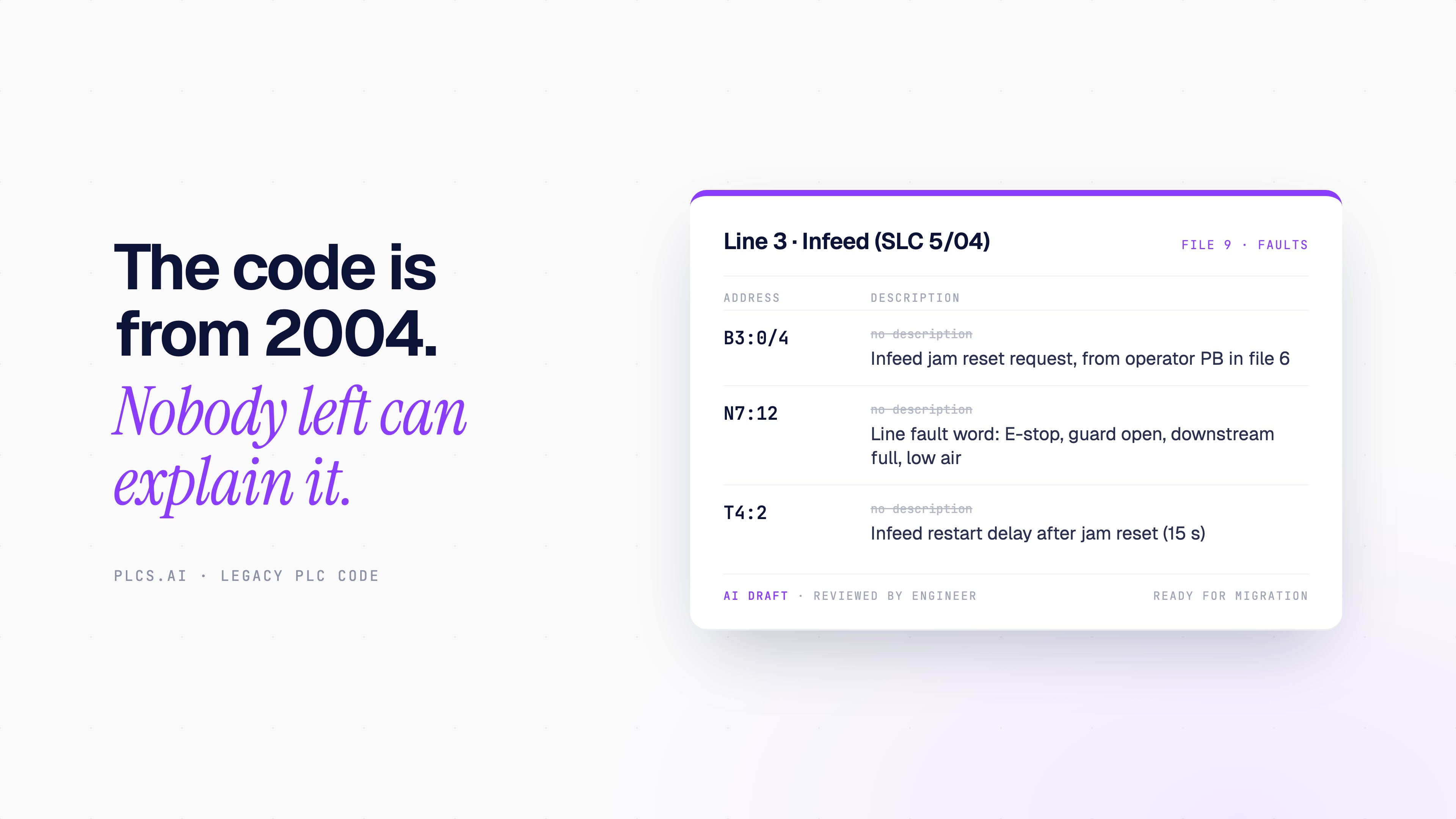
AI for legacy PLC code: understand, document and migrate programs nobody wants to touch
Can AI understand, comment or convert old PLC programs? What it does well on RSLogix 500, PLC-5 and S7-300 code, what the vendor tools still do, and what still needs an engineer.
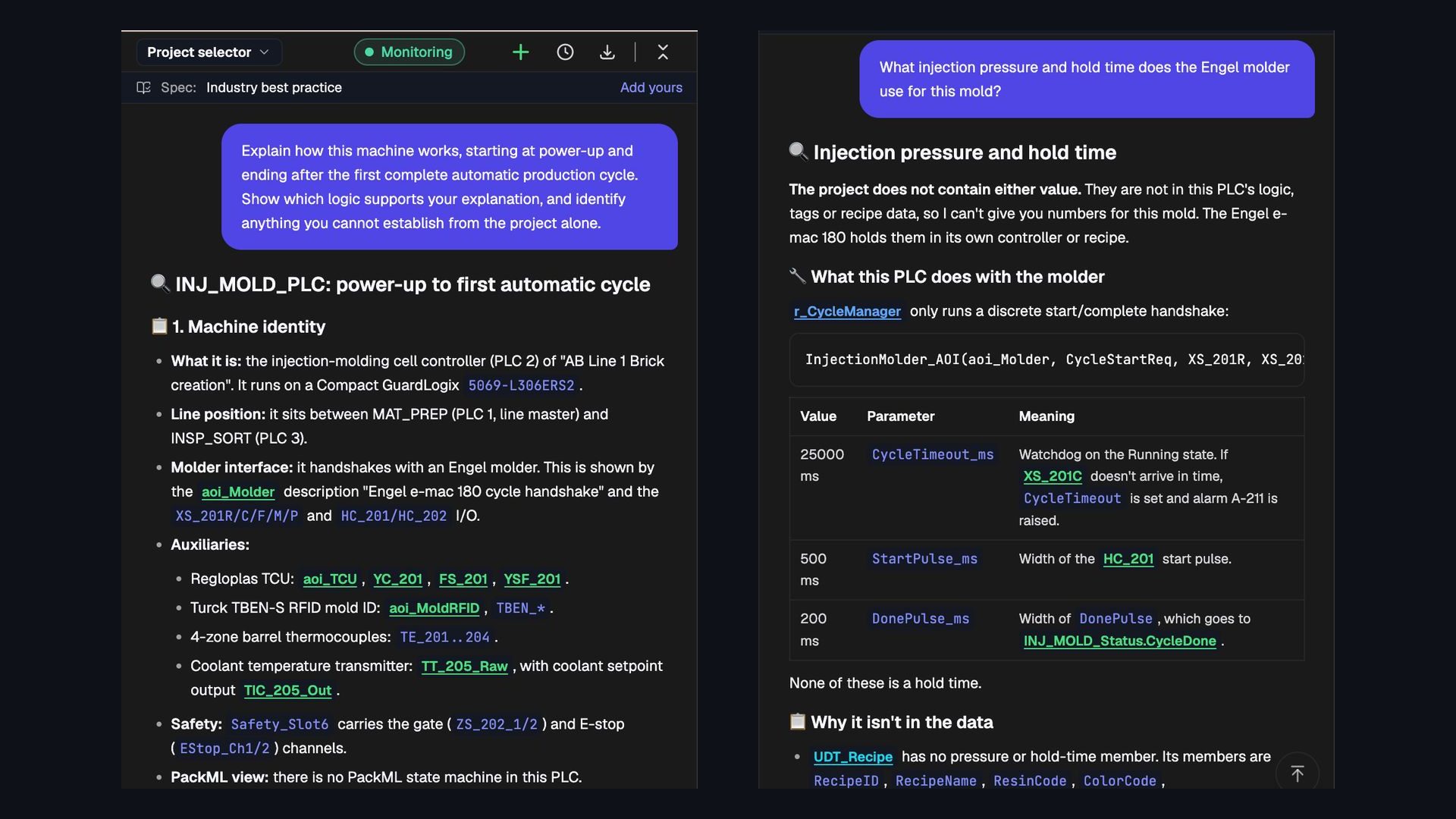
Can AI read an entire PLC project and explain how the machine works?
We asked PLCs.ai to explain an Allen-Bradley injection-molding cell from power-up to its first automatic cycle. What whole-project understanding looks like, and seven ways to test it.
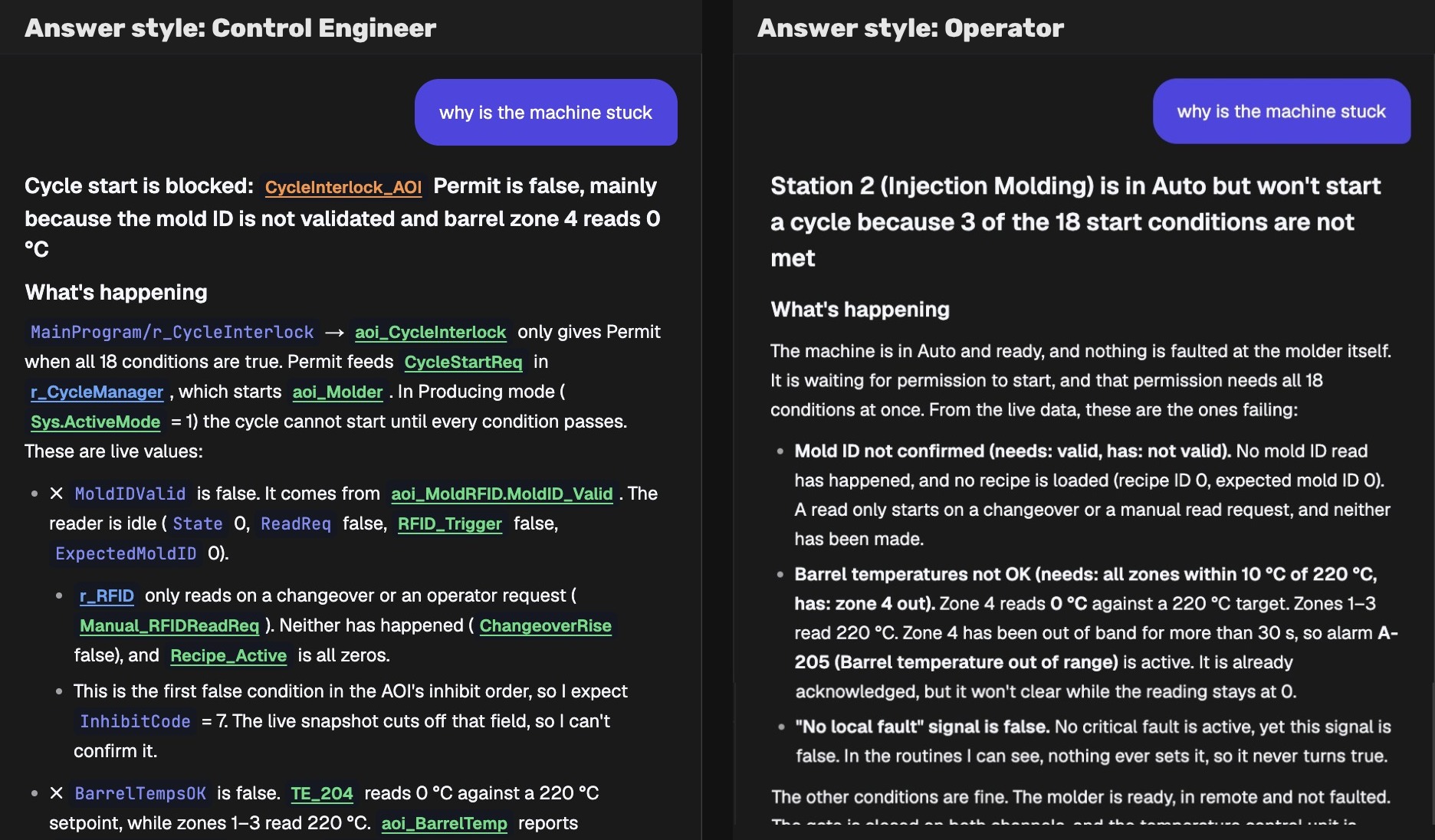
AI PLC Troubleshooting for Maintenance Teams Without the IDE
Most people who need PLC answers never open Studio 5000 or TIA Portal. How role-based AI gives operators and maintenance teams answers they can act on.