
PLC troubleshooting: the complete guide for 2026.
A systematic eight-step method for troubleshooting PLC faults, from status LEDs to live tag values. Written for the engineer staring at a stopped line, with the checks in the order that finds the fault fastest.
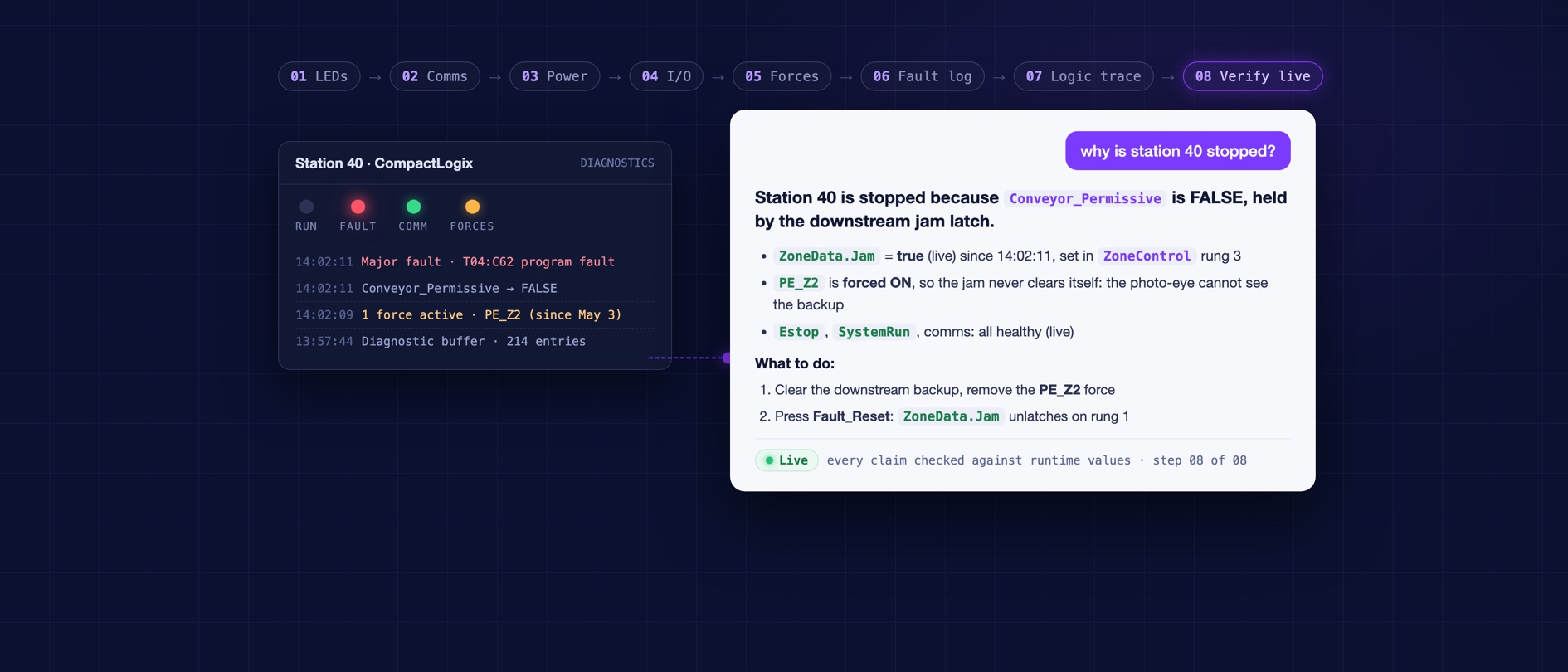
Every stopped line generates the same two questions: what is wrong, and how fast can we know for sure. This guide is the systematic answer to both. It is the eight-step method experienced controls engineers converge on after enough night shifts, written down in the order that finds the fault fastest, with the reasoning behind each step. It works with nothing but a laptop and the project file, and it gets dramatically faster with modern tooling, which we cover honestly at the end.
What are the most common PLC failures?
Before the method, the base rates, because good troubleshooting starts from what is likely. Across field studies and vendor failure analyses, roughly half of PLC-attributed downtime traces to communications: network drops, switch failures, cable damage, and address conflicts. I/O modules and field devices (sensors, valves, drives) are the next largest group, followed by power supply issues. The processor itself is the least likely culprit; genuine CPU failures are rare. The practical rule: suspect the edges of the system first and the brain last.
The eight-step method
| Step | Check | What it rules out |
|---|---|---|
| 1 | Status LEDs and fault codes | Hard faults, power, mode |
| 2 | Communications and networks | The most common failure class |
| 3 | Power and grounding | Brownouts, blown fuses, noise |
| 4 | I/O and field devices | Sensors, actuators, wiring |
| 5 | Forces and overrides | Someone else's leftover bypass |
| 6 | The fault handler and diagnostic buffer | What the controller itself logged |
| 7 | Logic trace from the symptom | The rung or state holding it |
| 8 | Verify against live values | Your own wrong theory |
Step 1: read what the controller is telling you. Status LEDs and fault codes exist so you do not have to guess. A solid fault LED, an OK light that is off, or a forced I/O indicator each collapses the search space instantly. On Allen-Bradley, check the controller and module status displays and the major fault log. On Siemens, the diagnostic buffer is the single most underused troubleshooting asset in the platform: it timestamps every fault, mode change, and module event.
Step 2: check communications before anything clever. Half the base rate lives here. Look for module connection errors, timeouts, and devices dropping off the network. A machine that faults intermittently at the same time every day is a network story more often than a logic story.
Step 3: power and grounding. Measure it, do not trust the panel meter. Brownouts and noise produce the strangest symptoms in the building: analog values that wander, outputs that chatter, comms that drop under load.
Step 4: I/O and field devices. Compare what the sensor says physically with what the input table says logically. A limit switch can be made and the input can still be dead: wiring, module channel, or terminations. Work the chain from the device to the tag.
Step 5: hunt for forces and overrides. The fault you are chasing may be a bypass someone applied during the last crisis and forgot. Every platform can list active forces; check the list before trusting any logic conclusion.
Step 6: read the controller's own account. The fault handler, the major and minor fault logs, and the diagnostic buffer describe what the controller experienced, in order, with timestamps. That ordering often answers the question "what happened first" that no amount of rung-staring resolves.
Step 7: trace the logic backwards from the symptom. Start at the output or state that is wrong and walk the conditions that produce it: which permissive is false, which interlock is holding, which step of the sequence never fired. This is where cross-references earn their keep, and where undocumented code makes an hour become a shift.
Every root cause built from code alone is a hypothesis. The confirmation step is where the time disappears.
Step 8: verify against the live values. Whatever theory steps 1 through 7 produced, the controller's live state is the verdict. The traditional version of this step is a walk to the panel with a laptop to watch the tags. However you do it, do not skip it: the plants with the worst downtime numbers are the ones where the first fix attempt is routinely wrong.
Can AI do this faster?
The method does not change; who executes it does. AI for PLC troubleshooting compresses steps 6 through 8 from the better part of an hour into minutes: it reads the entire project (every routine, tag, and cross-reference), traces the symptom back through interlocks and permissives the way step 7 prescribes, and checks each candidate against live tag values streamed from the running controller, so step 8 happens in the same conversation instead of at the panel. The engineer keeps the judgment; the software does the walking.
It also changes who can run the method at all. A maintenance tech on night shift can ask in plain English and get the trace a controls engineer would have built by hand, which matters at 2 a.m. when the controls engineer is asleep.
How PLCs.ai runs this method: AI PLC troubleshooting →What the diagnosis hour costs your plant, with sources →Why live values multiply everything above →More from the blog
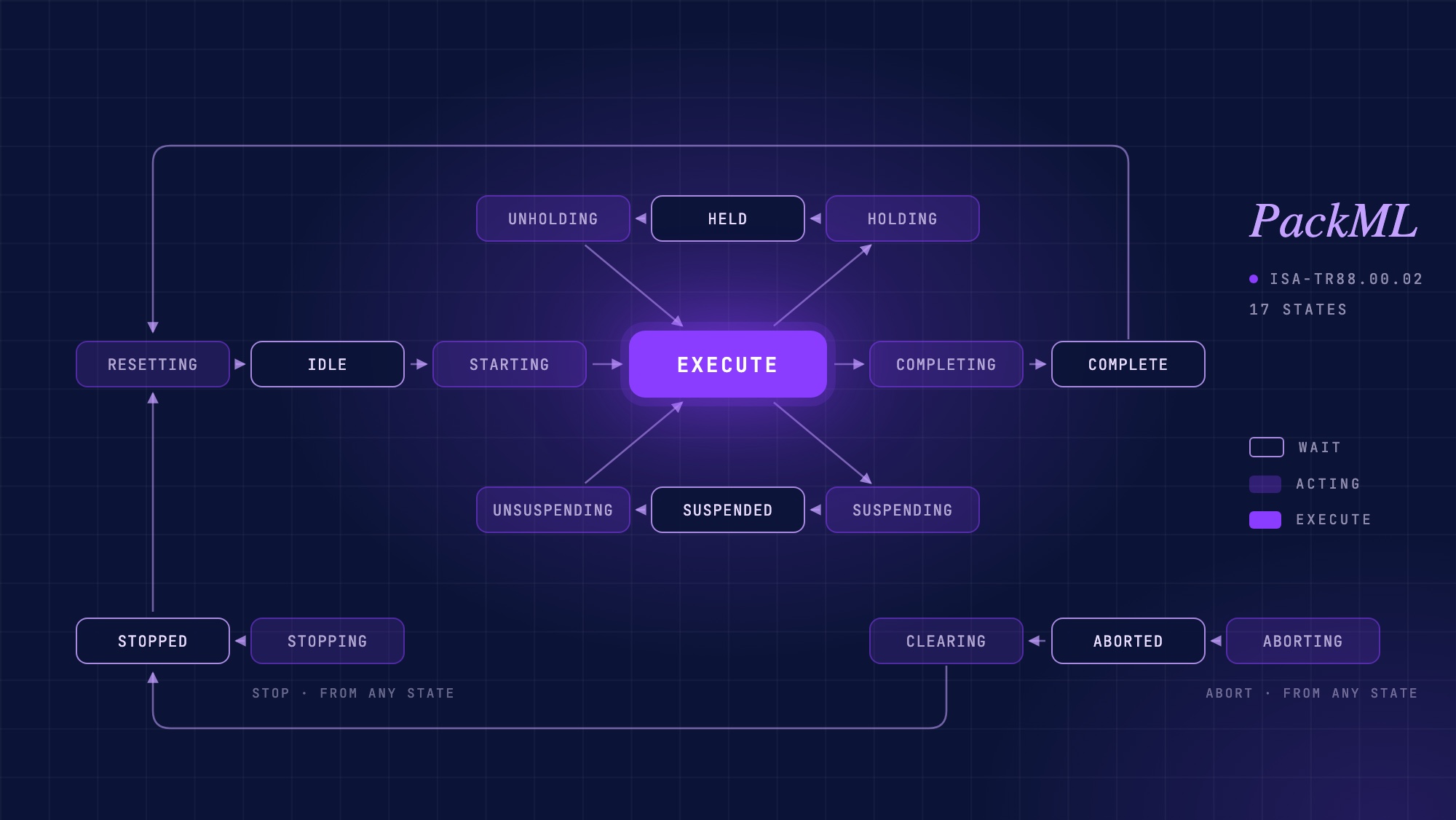
PackML explained: the state model, PackTags, and where AI fits
What PackML is, how the 17-state machine, modes and PackTags work, how to check whether a PLC project really follows it, and where AI helps.
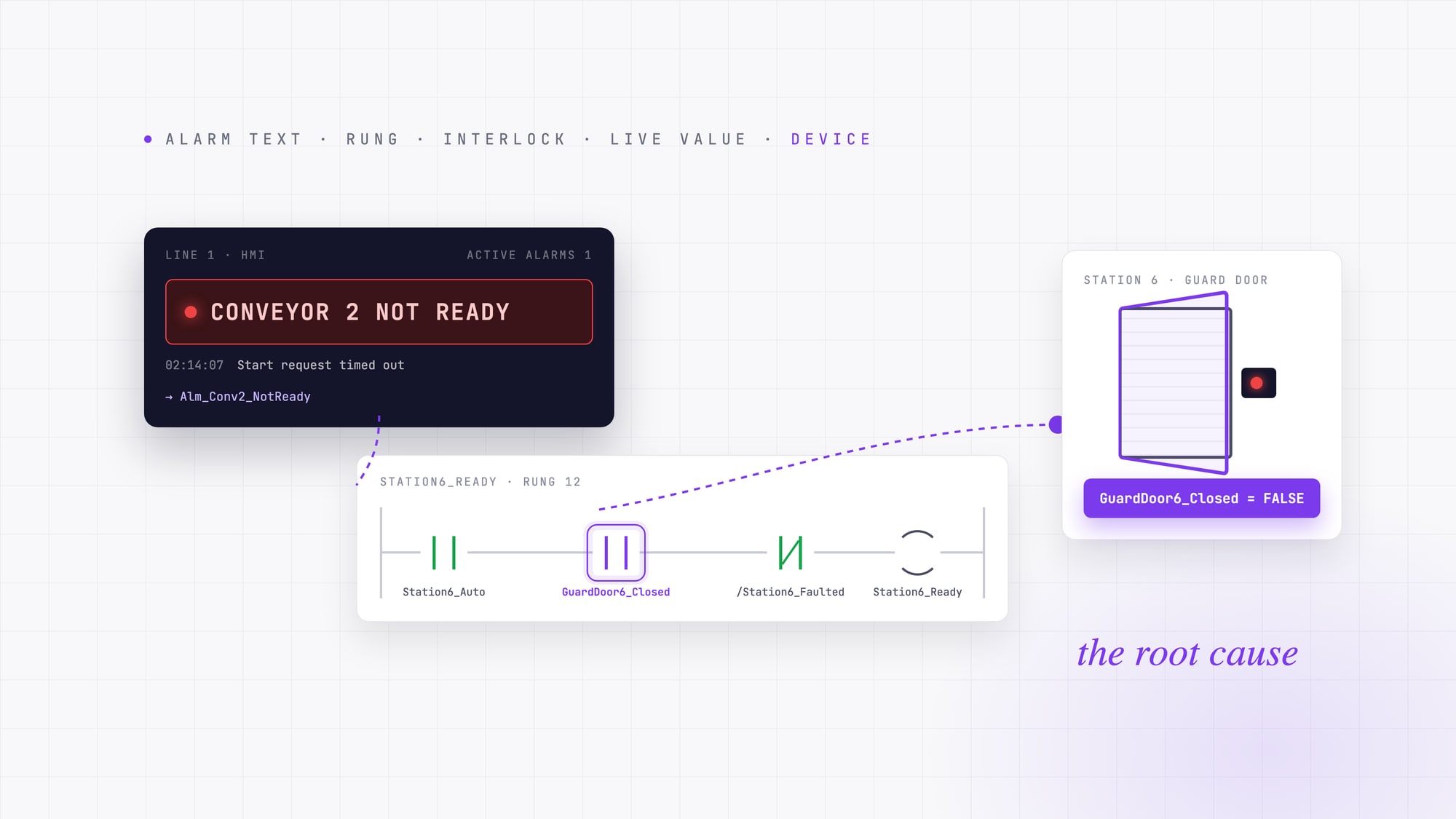
PLC fault codes and HMI alarms: how to trace an alarm back to its root cause
A PLC fault code or HMI alarm tells you where troubleshooting starts, not why the machine stopped. A field method for tracing an alarm from its text to the device behind it.
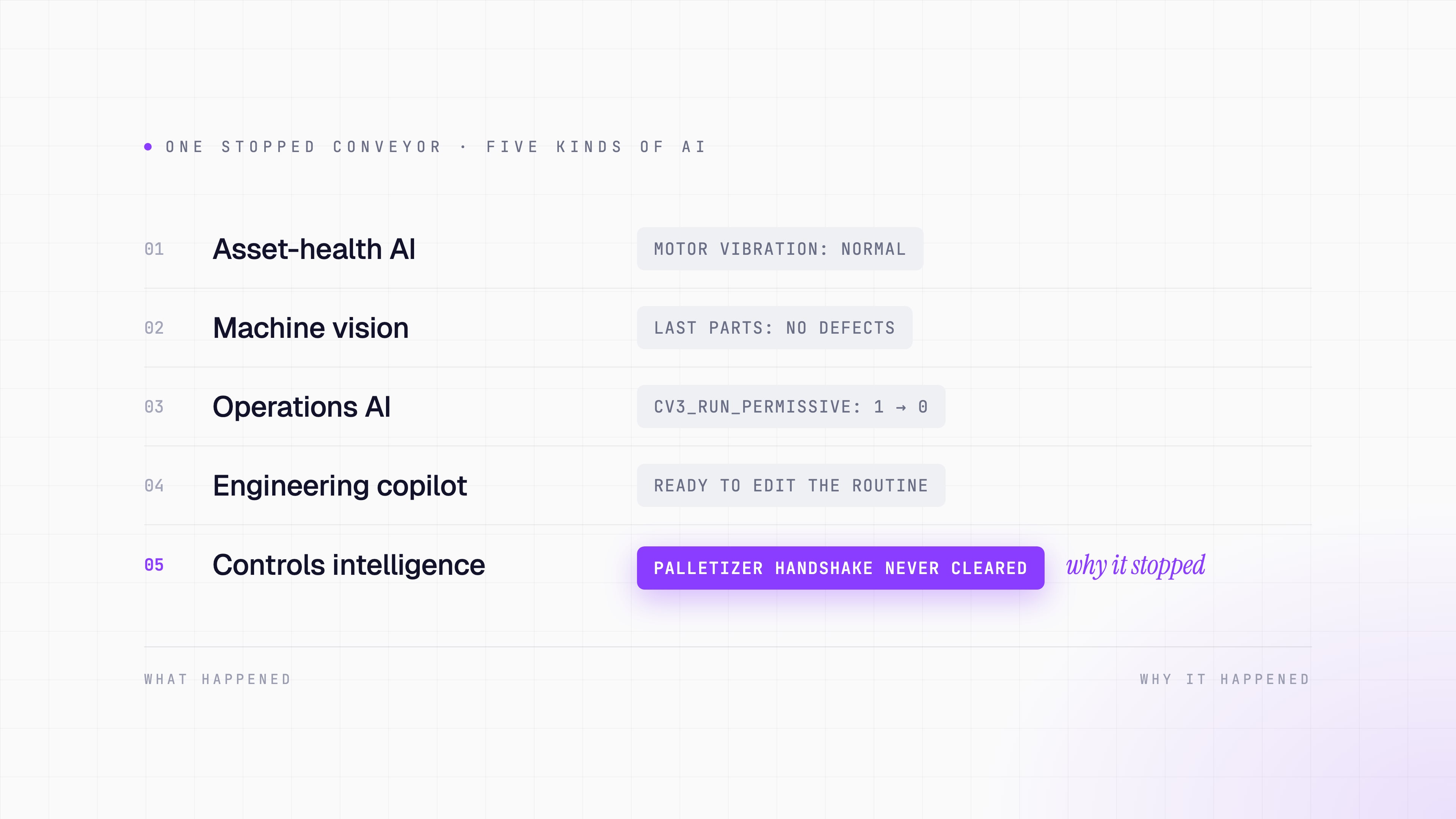
What is the best AI for industrial automation in 2026?
There is no single best AI for industrial automation. Compare industrial AI by the problem it solves, from machine vision to PLC troubleshooting.